

The best alternative to Foundation Software may not be another all-in-one ERP. If your current system feels outdated or too complex, rising seat and maintenance costs, along with the challenge of finding trained staff, may make a different approach worth considering. The right alternatives to Foundation software should improve visibility into project finances without adding unnecessary administrative work.
Your options range from construction accounting platforms for different company sizes to a service-based model that pairs specialized expertise with the software you already use. The practical goal is to improve visibility into job profitability, connect field and office information, and build a financial process that can scale without requiring a full-time IT administrator.
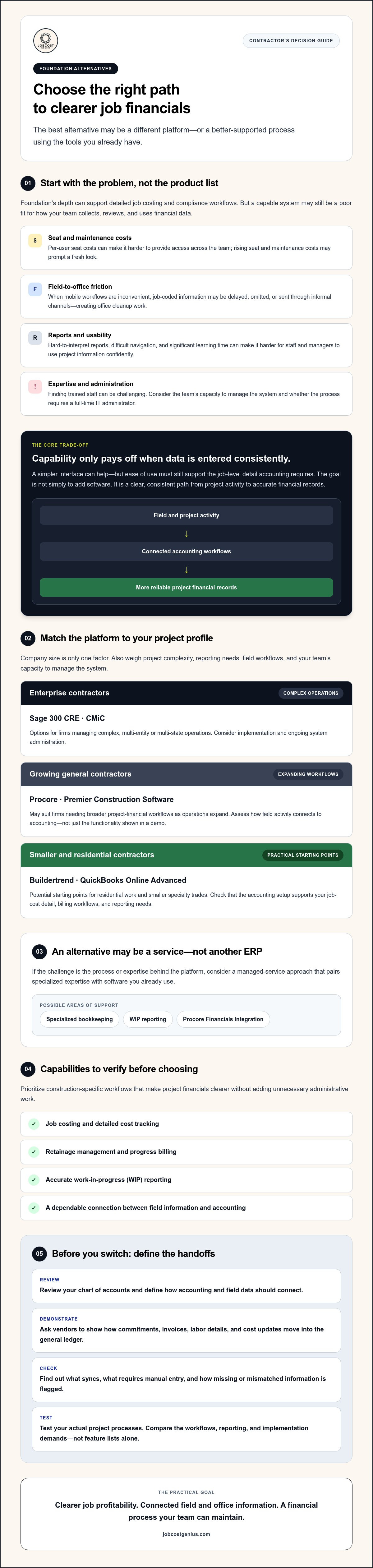
This guide compares software options for small, mid-sized, and enterprise contractors, along with a managed-service approach. You’ll find criteria for weighing features and implementation demands, and learn how specialized bookkeeping, WIP reporting, or Procore Financials Integration may offer a path beyond managing another complex system alone.
Key Takeaways
- Compare alternatives to Foundation software by company size and project complexity, not by feature lists alone.
- Consider whether the challenge is the platform itself or the processes and expertise behind it. A managed-service approach may be another path.
- Prioritize construction-specific capabilities such as job costing, retainage management, progress billing, and accurate WIP reporting.
- Before switching systems, review your chart of accounts and define how accounting and field data should connect.
- Choose a solution that supports clearer project financials without adding unnecessary complexity to your team.
Evaluating Foundation Software: Why Contractors Seek Alternatives in 2026
Foundation Software is a construction accounting ERP with capabilities such as certified payroll and job costing. Its depth can benefit teams that rely on detailed cost tracking and compliance workflows. However, for employees who don’t work in accounting every day, navigating reports, coding transactions, and locating project details can feel like looking into a black box.
That friction can show up in everyday operations. Contractors may start comparing alternatives to Foundation software when:
- Per-user seat costs make it harder to provide access across the team.
- Field staff lack convenient mobile tools for submitting timely, job-coded information.
- Reports are difficult to interpret or don’t give managers the visibility they need.
- Office staff need significant time to learn a specialized system.
These concerns don’t automatically mean the accounting platform is the problem. A system can be capable and still be a poor fit for how a company collects, reviews, and uses financial data.
The Complexity vs. Capability Trade-off
Powerful software produces useful job-cost information only when people enter data consistently. If field teams find the workflow confusing, they may delay entries, omit cost codes, or send information through informal channels. That creates cleanup work for the office and makes reports less reliable. A simpler interface can help, but ease of use must go hand in hand with the job-level detail accounting requires.
Training is another consideration. New office staff may need time to learn construction-specific workflows before they can work confidently with cost codes, payroll, and project reports. Cloud-based systems and connected tools can bring clearer workflows together with detailed reporting. Compare the trade-offs using a comparison of accounting software, then test how each option handles your actual project processes.
Modern Integration Needs: Beyond Core Accounting
Accounting is only one part of the information flow. Project teams also need a dependable way to move commitments, invoices, labor details, and cost updates from field and project-management workflows into the general ledger. Ask vendors to demonstrate how data syncs, what requires manual entry, and how the system flags missing or mismatched information.
This is why some contractors favor a best-of-breed stack over a single legacy platform. Field-first data entry can capture details closer to the work, while accounting tools support financial review and reporting. The goal isn’t simply to add more software. It’s to create a clear, consistent path from project activity to accurate financial records, with roles and handoffs the team can maintain.
Top Construction Accounting Software Tiers for 2026
The right choice depends on more than company size. Project complexity, reporting needs, field workflows, and the team’s capacity to manage a system all affect whether a platform will work in practice. Grouping alternatives to Foundation software by these factors can help narrow the options before you compare features or plan a migration.
Match the Platform to Your Project Profile
Enterprise contractors: Sage 300 CRE and CMiC are options for firms managing complex, multi-entity or multi-state operations. They offer the depth expected of construction ERPs, but implementation and ongoing system administration need careful consideration.
Growing general contractors: Procore and Premier Construction Software may suit firms that need broader project-financial workflows as operations expand. Assess how each connects field activity to accounting, not just how much functionality appears in a product demo.
Smaller and residential contractors: Buildertrend and QuickBooks Online Advanced may be practical starting points for residential work and smaller specialty trades. Check whether the accounting setup supports the job-cost detail, billing workflows, and reporting your projects require.
Construction finance professionals can also consult the Construction Financial Management Association (CFMA) for industry resources when assessing financial processes and reporting needs.
The Best-of-Breed Approach: Procore and QuickBooks
Some contractors pair a field and project-management platform like Procore with a general ledger such as QuickBooks rather than adopting one large ERP. This approach can give field teams purpose-built workflows while keeping accounting in a familiar system. The trade-off is that integrations, data ownership, and reconciliation need clear oversight. Explore Procore Financials Integration to understand the considerations for maintaining accurate field-to-office data. Compare the full cost of licenses, integration, and support before assuming a connected stack will cost less than an ERP.
Heavyweight Alternatives: Sage and CMiC
A specialized ERP may be justified when your company’s project volume, entities, or reporting requirements call for broader controls. Learn more about Sage 300 CRE bookkeeping as you evaluate that option. Traditional construction systems can provide deep accounting capabilities, but unused modules and poorly maintained workflows can create system bloat. Define who owns configuration, data standards, and staff training before committing.
There’s also a service-based path. JobCost Genius offers Starter, Growth, and Premium plans, along with WIP Reporting and Procore Financials Integration. Contractors comparing systems can review the construction accounting support options as they decide how much of the financial workflow should sit in software versus expert-managed processes.
The Managed Service Alternative: Why Better Software Isn’t Always the Answer
A software problem can actually be a process or staffing problem. If job costs are coded inconsistently, transactions sit unreconciled, or no one owns the reporting workflow, a new platform may simply move the same issues to a different screen. There’s a third option: keep a suitable accounting tool, or move to a simpler one, and bring in specialized oversight to manage the construction financial workflow.
With outsourced bookkeeping for construction firms, contractors can shift day-to-day bookkeeping oversight to specialists rather than relying solely on internal staff to learn and maintain a complex system. Compare the total demands of each approach, including software, training, management time, and reporting needs. A useful measure is the result: a dependable WIP report and clear job-cost visibility matter more than the software logo on the screen.
Reducing the Labor Burden of Construction Accounting
A full-time construction controller and a specialized bookkeeping arrangement serve different needs, so compare responsibilities before comparing costs. Consider the volume and complexity of your projects, who reviews financials, and which tasks require in-house decision-making. A managed service may reduce dependence on one employee who knows Foundation, but only if procedures, access, and reporting responsibilities are documented rather than held in one person’s memory.
JobCost Genius offers tiered Starter, Growth, and Premium plans, along with WIP Reporting and Procore Financials Integration. For contractors who want support with job costing and reporting, this service-based model offers another way to organize financial operations without treating a software replacement as the only answer.
Expert Oversight for WIP and Job Costing
Software can calculate and display information, but it can’t independently determine whether project inputs are complete or whether an unusual margin movement reflects a coding error, a scope change, or a genuine cost issue. Human review helps identify questions to resolve before reports inform management decisions. Learn more about WIP reporting for construction companies and the judgment involved in interpreting work in progress.
Build a review process around source documents, job costs, percent complete, and changes in projected revenue or cost. For certified payroll and AIA billing workflows, confirm which steps your software supports and who is responsible for review. Don’t assume a platform or outside provider covers every requirement. The Construction Financial Management Association’s discussion of transforming construction accounting with AI offers context on how technology can support accounting work, while human oversight remains essential for sound controls.
As you assess alternatives to Foundation software, consider whether your main gap is software capability, consistent processes, or specialized expertise. Reviewing construction bookkeeping and reporting options can help clarify whether a managed-service approach fits your team’s needs.
Critical Features Your Foundation Alternative Must Support
Construction accounting depends on more than recording income and expenses. A capable alternative needs to handle the project-level calculations behind cost control, billing, labor, and cash flow. As you compare alternatives to Foundation software, test each platform against real workflows from your jobs, not just a polished demo.
Start with these core capabilities:
- WIP reporting: Review percent complete, costs to date, projected costs, and earned revenue together. Confirm how often the underlying data updates and whether unusual margin changes are easy to investigate.
- Certified payroll and labor burden: Check how the system handles prevailing-wage information and tracks the full cost of labor, including applicable burden. Verify that reporting fits your company’s actual payroll process.
- AIA-style billing: Ask whether the platform can prepare G702/G703 continuation sheets from project data, including retainage, without repeated manual spreadsheet work.
- Job-level detail: Confirm that costs can be assigned consistently to the right project, phase, and cost code, then reviewed against budgets and commitments.
Job Costing and Retention Tracking
Retainage affects both the amount billed and the cash expected later, so it needs a clear record from each progress invoice through release. Check whether the system tracks withheld amounts by project and billing period, shows outstanding balances, and supports your team’s process for requesting and reconciling release. Correct cost coding matters just as much: misclassified expenses can obscure project performance and complicate construction cash flow management.
Field-to-Office Data Flow
Accurate job costing starts where work happens. Mobile time entry can capture labor against the correct job and cost code before details are lost or reconstructed from memory. Look for a reliable path from field submissions into accounting, with clear review steps and fewer duplicate entries. Confirm what syncs automatically, what requires approval, and how errors are corrected.
Daily logs can add useful context to labor, progress, and job-cost records. They help teams document what was reported on site, but they don’t replace organized records or a defined review process. During software evaluation, walk through a sample day: enter time, record job activity, review costs, and trace the information into a financial report.
JobCost Genius provides specialized WIP Reporting to support construction financial visibility. Explore construction WIP reporting options as you assess how your reporting process can better support project decisions.
Transitioning from Foundation: A Strategy for Success
Switching construction accounting systems is a controlled data and workflow change, not just a software installation. Before choosing among alternatives to Foundation software, define what must transfer, who will validate it, and how the team will keep project financials consistent during the changeover.
- Step 1: Audit the data. Review and clean up your chart of accounts, cost codes, vendor records, and open balances before migrating. Decide which historical detail needs to move and check that project costs map correctly to the new structure.
- Step 2: Define the tech stack. Decide whether you need an all-in-one ERP or a field-to-office setup connecting project-management workflows to accounting. Document which system owns each data point and how information will sync.
- Step 3: Run systems in parallel. Where practical, operate the new system alongside Foundation for at least one month. Compare key balances, job costs, payroll outputs, and WIP reports, then resolve discrepancies before relying on the new system alone.
- Step 4: Use construction-specific implementation expertise. Choose an implementation team that understands construction accounting and project data. A generalist IT provider may understand data transfer but miss how cost codes, retainage, and open commitments affect financial reports.
Minimizing Downtime During Software Migration
January 1 isn’t automatically the best cutover date. Choose a period that gives your team time to validate records and avoids overlapping with a demanding close or major operational deadline. For projects spanning both platforms, set a clear cutover date, document opening costs and commitments, and assign each transaction to one system to prevent duplicate entries. Train by role: show each person how daily tasks change, where to enter information, and how to flag errors.
The Role of JobCost Genius in Your Migration
A service-based approach can help firms move from managing complex legacy workflows toward more supported bookkeeping and reporting processes. JobCost Genius offers Starter, Growth, and Premium plans, specialized WIP Reporting, and Procore Financials Integration. The Premium Plan is one of the available tiers; confirm directly how its scope fits your company’s requirements and chosen systems.
JobCost Genius focuses on construction bookkeeping, WIP reporting, and Procore Financials Integration. During your evaluation, clarify which migration tasks your software provider or implementation specialist will handle, and which responsibilities remain with your internal team or service provider. That distinction helps set realistic expectations and avoid gaps in data ownership.
Planning a transition? Explore construction bookkeeping and integration options to consider how specialized support may fit your move from Foundation.
Build a Financial System That Can Grow With Your Firm
The right alternatives to Foundation software depend on your project complexity, reporting needs, and team’s capacity to manage a new system. Compare construction-specific features such as job costing, WIP reporting, and field-to-office data flow, then plan your migration carefully. A new platform isn’t the only option. Specialized oversight may address process and reporting gaps without requiring a complete system change.
JobCost Genius provides construction bookkeeping and financial reporting services, including WIP Reporting and Procore Financials Integration. If you’re weighing a software change or a managed approach, explore financial oversight options for your construction firm and consider which approach best fits your operations.
With a clear plan and the right construction expertise, you can improve financial visibility and move forward with greater confidence.
Frequently Asked Questions
Is QuickBooks Online a good alternative to Foundation for construction?
QuickBooks Online can work for smaller contractors with straightforward accounting needs, especially when paired with construction-specific tools or carefully managed processes. It may not provide every construction function natively, such as detailed job costing, WIP reporting, retainage tracking, or certified payroll workflows. Before switching, check how you’ll handle those requirements and whether the integrations cover your projects. The best fit depends on your reporting needs, project complexity, and available accounting expertise.
What is the most user-friendly construction accounting software in 2026?
There isn’t one most user-friendly option for every contractor. Ease of use depends on the tasks each person needs to complete, from entering field costs to reviewing project reports. Ask vendors to demonstrate your team’s daily workflows using realistic project examples. Compare mobile access, navigation, training requirements, and how easily staff can find job costs. A simpler interface is valuable only if the platform still supports the accounting detail and controls your business needs.
Can I integrate Procore with my current accounting software to avoid switching?
Procore may be connected with accounting software, but available workflows vary by accounting platform and integration setup. Confirm which data can sync, such as commitments, invoices, or project costs, and whether updates flow automatically or need review. Also clarify how the connection handles coding, duplicate records, and errors. A well-designed integration may let you keep your current ledger while improving field-to-office data flow, but test it before relying on it for financial reporting.
How much does it cost to migrate away from Foundation Software?
Migration costs depend on the new platform, data quality, number of users, project complexity, and the amount of implementation and training required. Potential expenses may include software subscriptions, setup, data conversion, integration work, and temporary parallel operation. Ask vendors for a written scope that separates one-time implementation charges from ongoing fees. You should also budget internal staff time for auditing records, validating balances, and resolving differences before the new system becomes your primary source.
Does Foundation Software still offer a desktop version in 2026?
Confirm Foundation Software’s current deployment options directly with the vendor, since availability and support can change over time. Ask whether the specific product and configuration you’re considering is desktop-based, cloud-hosted, or a combination, and clarify how updates, backups, remote access, and support work. If you’re an existing customer, review your contract and contact your account representative. Don’t assume that another contractor’s setup reflects the options available to your company in 2026.
What is the difference between a construction ERP and a general ledger?
A general ledger records core financial transactions, such as revenue, expenses, assets, and liabilities. A construction ERP typically combines accounting with project-oriented functions, which may include job costing, progress billing, commitments, payroll workflows, and project reporting. Capabilities differ by platform, so verify the features rather than relying on the product category alone. Contractors may use an ERP or connect a general ledger to specialized project tools, depending on their complexity and operational needs.
How does JobCost Genius help if I already have construction software?
JobCost Genius can support contractors who want specialized construction bookkeeping, WIP Reporting, or Procore Financials Integration without treating a software replacement as the only solution. Its services provide financial oversight and reporting around a contractor’s systems. Discuss your existing software, data workflows, and reporting needs to determine whether the available Starter, Growth, or Premium plan and relevant services fit. Confirm the exact scope before making a decision.
Which software is best for certified payroll and prevailing wage jobs?
The best choice depends on the payroll workflows, reporting requirements, and project types your company needs to manage. Foundation is known for construction accounting features that include certified payroll, while other construction-focused platforms may offer relevant capabilities as well. Ask vendors to demonstrate how the system handles wage classifications, job coding, payroll records, and required reports for your work. Verify that its features match your specific obligations and internal review process before selecting or switching platforms.


