

The platform with the most financial features isn’t automatically the one that gives your business the clearest job-cost picture. In the buildertrend vs procore financials comparison, the practical question is how each platform’s project workflows connect with your accounting process and the records your team relies on.
Dashboards, budgets, and payment tools are useful, but project-management features and financial controls serve different purposes. If field updates, project records, and accounting data fall out of sync, even a capable platform can leave your team with an incomplete view of a job or the business.
This guide compares how Buildertrend and Procore can support construction financial workflows, and how project complexity, team responsibilities, and accounting-system fit affect the decision. It also outlines what to test before committing, from transaction handling and reconciliations to month-end reporting. For businesses considering Procore, construction-focused bookkeeping, WIP reporting, and integration support can help connect project workflows to useful financial visibility.
Key Takeaways
- Compare Buildertrend and Procore by how their project workflows align with your accounting system, not by feature count alone.
- Use the buildertrend vs procore financials comparison to assess fit across project types, team roles, workflow complexity, and reporting needs.
- Separate each platform’s native capabilities from features that depend on integrations, and trace how information moves through your financial workflow.
- Test representative jobs, cost codes, change activity, billing, and month-end reporting before committing to a setup.
- Build consistent transaction records and reconciliations into the process so project-cost information can support monthly statements and WIP review.
Buildertrend vs. Procore Financials: What Is the Real Difference?
The decision isn’t simply which platform has more features. It’s whether the software fits how your projects run, gives the right people useful financial visibility, and connects appropriately with your accounting system. Those factors determine whether project information can support decisions or remains scattered across separate workflows.
Construction financials include project budgets, commitments to subcontractors and suppliers, costs incurred, billing, and the accounting records that capture business activity. Software can help teams organize and monitor this information, but project-level status and company-wide accounting serve different purposes.
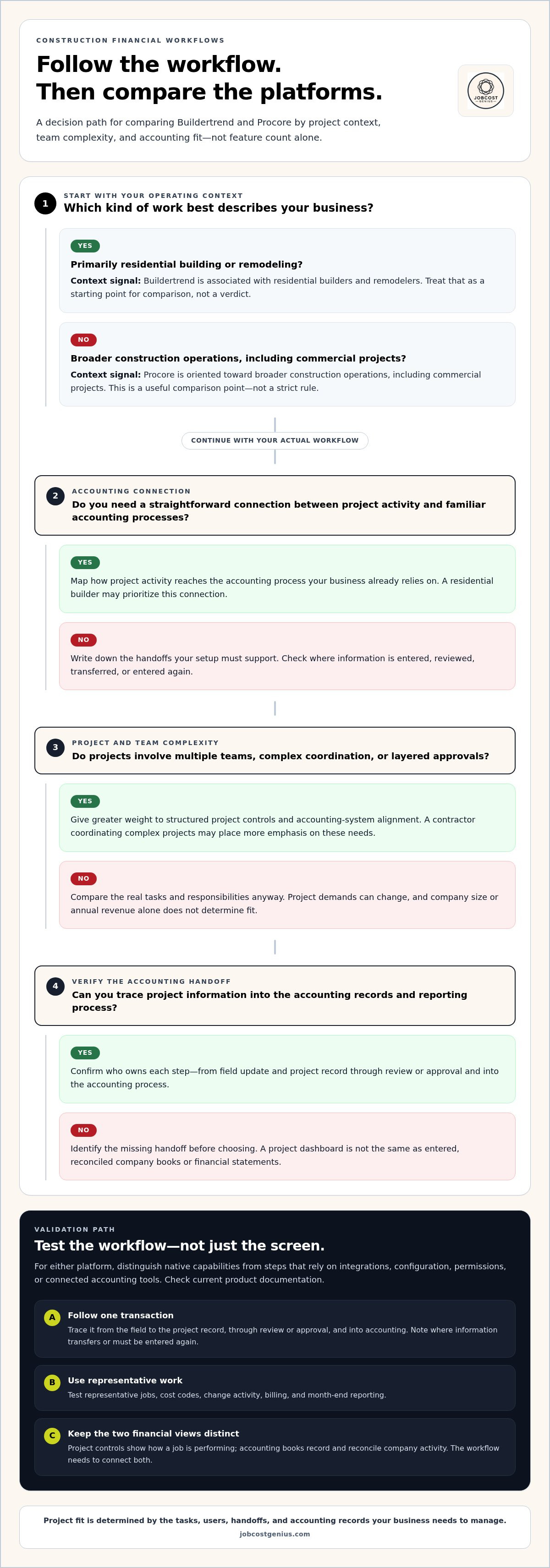
Project financial controls show how a job is performing; the accounting books record and reconcile the company’s financial activity. The two need to work together, but a project dashboard alone isn’t the same as reconciled company financial statements.
What does financial management mean in construction software?
At the project level, a budget sets the planned cost baseline. Commitments track amounts agreed to with subcontractors or suppliers, while cost tracking records what has been spent or incurred. Billing documents amounts charged to customers, and change documentation captures adjustments to scope, cost, or contract value. Together, these records help a team understand a job’s financial progress.
That view is only as useful as its underlying information. A displayed cost or forecast can help project staff manage work, but it doesn’t confirm that transactions have been entered, reconciled, and reflected in the company’s books. Feature names and availability can vary by product edition and configuration, so use current product documentation to distinguish included capabilities from workflows that depend on integrations.
Why do Buildertrend and Procore attract different comparisons?
Their market positioning points toward different operating contexts. Buildertrend is associated with residential builders and remodelers, while Procore is oriented toward broader construction operations, including commercial projects. These are useful starting points, not strict rules. Annual revenue or company size alone can’t determine which platform fits.
Instead, look at how work moves through your business. A residential builder may prioritize a straightforward connection between project activity and familiar accounting processes. A contractor coordinating complex projects, multiple teams, and layered approvals may place greater weight on structured project controls and accounting-system alignment. In either case, compare the actual tasks, users, and handoffs your team needs to manage.
For buildertrend vs procore financials, the practical distinction is less about labeling one platform “better” and more about identifying the workflow each can support in your setup. Map who enters costs, who approves changes, how billing is prepared, and where final accounting records are maintained. Then trace how information passes between those people and systems.
- Project workflow: Does the platform reflect how your team budgets, tracks commitments, and documents changes?
- People and complexity: Can field staff, project managers, and accounting users follow clear responsibilities as project demands grow?
- Accounting connection: Does the proposed setup support the records and reporting process your business relies on?
These questions provide a baseline for comparing features and integrations. Assess the full workflow, not just the software screen where a number appears.
How Buildertrend and Procore Connect Project Workflows to Financials
To compare financial workflows, follow a transaction from the field to the project record, through review or approval, and into the accounting process. A cost may appear in a project tool before it reaches the reconciled books. Identify where each step happens, who owns it, and whether information transfers between systems or must be entered again.
Which financial workflows should you compare?
Use this table as a workflow checklist, not a guarantee that a feature is included in every edition or setup. Check current product documentation to distinguish native capabilities from steps that rely on integrations, configuration, permissions, or connected accounting tools.
| Workflow | Buildertrend | Procore |
|---|---|---|
| Budgets and cost-to-complete | Review how project budgets and job costs are set up, updated, and used to assess remaining costs. | Review how budget information and forecasts are structured for project teams and financial reviewers. |
| Commitments and cost coding | Trace how purchase commitments and costs are assigned to the right project and cost categories. | Trace how commitments, costs, and coding flow through project financial workflows. |
| Invoices and billing | Map how invoices are received, reviewed, and connected to project costs, and how customer billing is prepared. | Map the equivalent review and billing steps, including any required approvals or accounting handoffs. |
| Changes and reporting | Check how change documentation affects the project budget and which financial views are available to the team. | Check how changes are recorded and reflected in budget, forecast, and project reporting workflows. |
For each row, identify where information is entered, who reviews it, and who approves it. For example, if a field team reports a scope change, trace how that update becomes an approved change, affects the project budget, and reaches the office team preparing billing. Missing cost codes or delayed approvals can weaken that chain even when the software records each step.
How should you assess accounting-system connections?
Compare the connection your business needs, not just the accounting-system name. If you use QuickBooks Online or Sage 300 CRE, document which records should move between systems, the direction of each transfer, and who reviews errors or exceptions. Verify current compatibility, product edition, permissions, configuration, and any connector or middleware requirements in official documentation. Don’t assume a connection syncs every record or eliminates reconciliation.
Connected project data can improve visibility, but it doesn’t automatically create reconciled accounting books. Transaction review, account reconciliation, and consistent coding still matter. For teams assessing Procore handoffs, this Procore Financials integration guide explains the field-to-office data connection. Construction-focused Procore integration and bookkeeping support can help align project records with dependable financial reporting.
Buildertrend vs. Procore: Which Financial Setup Fits Your Projects?
The right setup depends on the work your team needs to coordinate, the controls it must apply, and the reports it needs to produce. Residential construction, remodeling, and larger multi-project operations can place different demands on project workflows. Use the matrix below to identify your priorities before comparing specific features.
| Evaluation factor | Buildertrend may suit | Procore may suit |
|---|---|---|
| Project type | Residential building and remodeling workflows where project and customer processes are central. | Commercial or larger project environments with multiple workstreams to coordinate. |
| Team roles | Teams that need project staff and the office to follow a clear, manageable process. | Operations with distinct project, field, and accounting responsibilities that need defined handoffs. |
| Workflow complexity | Projects with repeatable steps and controls that match the company’s day-to-day work. | Projects that require more structured coordination, review, and financial oversight. |
| Reporting needs | Teams focused on practical project-cost visibility and reporting suited to their accounting process. | Teams evaluating more extensive project reporting and connections to their accounting environment. |
This is a starting point, not a verdict. A residential contractor managing several concurrent jobs may need disciplined approvals and cost controls, while a larger firm may have straightforward processes. Company size alone doesn’t determine fit. Compare project complexity, user responsibilities, reporting needs, and how project information connects to accounting. Check each platform’s current financial tools, supported connections, and availability in official product documentation before relying on a specific capability.
When might Buildertrend fit a team’s financial workflows?
Buildertrend may be worth evaluating when residential building or remodeling workflows are central to the business and project activity needs to fit alongside customer communication and office processes. Map how your team handles budgets, changes, costs, and billing, then compare that sequence with Buildertrend’s documented tools and accounting connections. The fit depends on whether the product supports your actual handoffs, not on a general claim that it suits every residential contractor.
When might Procore fit a team’s financial workflows?
Procore may be a stronger candidate when projects involve multiple user roles, detailed cost oversight, and reporting requirements that call for structured coordination. Document who enters, reviews, and approves financial information, then compare the relevant Procore Financials features and accounting connections with your process. For the bookkeeping practices that support reliable project reporting, this construction accounting guide provides broader context.
Neither platform can correct inconsistent cost coding, late transaction entry, or unreconciled accounts. Software can organize a process, but people still need clear responsibilities and consistent financial routines. That discipline turns project activity into information the business can use.
For teams considering Procore, Procore Financials integration support can help connect project workflows with construction-focused bookkeeping and reporting.
A Practical Checklist for Evaluating Buildertrend and Procore Financials
A product demonstration can look polished while leaving important handoffs untested. Use a representative job and follow its information through project setup, approvals, accounting, and reporting. This makes the buildertrend vs procore financials decision practical: you can compare how each setup handles real processes, not just a feature list.
What should you test before selecting a platform?
Run the same scenarios in each platform, using familiar project details and realistic examples. Record manual work, duplicate entry, unclear ownership, and unresolved exceptions. Those findings show where the proposed setup supports your process and where the team may need a procedure or additional review.
- Map the current process. Document how a job moves from setup and budget approval through purchasing, cost entry, billing, and month-end reporting. Note who handles each handoff.
- Choose representative jobs. Include a typical project and one with more complex cost coding or change activity. Use the same examples to compare both platforms consistently.
- Test project financial activity. Enter or trace budget updates, commitments, invoices, and a documented change. Follow each item through review and approval, noting where permissions or configuration affect the workflow.
- Trace a transaction end to end. Follow it from initial entry through project review and the accounting process to management reporting. Identify which system owns the record at each point.
- Check exceptions and duplicate work. Record missing cost codes, rejected entries, corrections, manual transfers, and information users must enter twice. Assign an owner and resolution process for each exception.
- Review month-end output. Compare project-cost information with the accounting reports your business uses. If WIP is part of the reporting process, define the source information and review steps it requires. This WIP reporting guide can help frame those requirements.
How do you prepare the team and financial data?
Before configuration or migration, assign clear responsibility for project setup, cost coding, approvals, and account reconciliation. Review existing cost codes for duplicates, inconsistent naming, and gaps that could undermine comparisons across jobs. Decide who owns project records and accounting records, then set permissions so users can complete their tasks without unnecessary access or approval bottlenecks.
Training should reflect actual roles. Field users, project managers, and accounting staff need practice with the actions they’ll perform, especially approvals and corrections. Review early reporting periods to catch coding mismatches, late entries, and unresolved exceptions while processes are being established.
Use the test results to create a short implementation plan with process owners, training needs, and reporting checks. For construction-focused support connecting Procore workflows with bookkeeping and reporting, explore Procore Financials integration support.
Turn the Software Decision Into Dependable Construction Financial Reporting
Choosing Buildertrend or Procore sets up a way to manage project information. Reliable reporting still depends on what happens around the software: transactions need consistent coding, accounts need regular reconciliation, and project records must be reviewed alongside company financial activity. Without those routines, a job-cost view may not align with the monthly statements used to assess the business.
What financial processes keep platform data useful?
Start with a repeatable close process. Categorize transactions to the correct accounts and jobs, reconcile bank activity, and prepare monthly financial statements from reviewed records. Consistent accounts payable and accounts receivable procedures matter too. They help the team track what the company owes and what customers owe, while maintaining clear links between project activity and company records.
For example, review and record a supplier invoice with the appropriate job and cost information. A documented approval and payment process helps keep the project record and accounting entry aligned. If a transaction is late, coded inconsistently, or left unreconciled, software alone can’t resolve the gap. These controls support clearer reporting, but they don’t guarantee profitability or eliminate errors.
Use the monthly close to compare project-cost information with accounting records and investigate differences. A Work in Progress review can then draw on more consistent information about active jobs. Its value comes from disciplined records and a defined review process, not simply from generating another report.
How can specialized bookkeeping support a Procore workflow?
For a Procore setup, integration support can help align project information with accounting processes and clarify how records move between project and financial workflows. The connection and handoffs should reflect the company’s systems, responsibilities, and review procedures. JobCost Genius supports Procore Financials integration alongside construction-focused bookkeeping and WIP reporting, connecting organized records with useful financial visibility.
That support works best when transaction handling, reconciliations, and reporting responsibilities are clearly established. Construction bookkeeping can help maintain consistent records across project activity, accounts payable and receivable, and monthly reporting. It gives owners and project teams a more reliable basis for reviewing costs and financial position, without treating software as a substitute for sound accounting processes.
To understand how project and office information can be aligned, see the Procore integration services overview. It provides context for weighing the accounting process behind your buildertrend vs procore financials decision.
JobCost Genius was founded by professionals with over 20 years of industry experience and offers recurring service plans alongside construction bookkeeping, WIP reporting, and Procore Financials integration support. If you’re ready to connect your software choice with a practical accounting process, discuss your construction financial workflows.
Set Up Your Next Step With Financial Clarity
Your software decision is an opportunity to align project and accounting workflows. Before committing, identify the financial information your team needs to trust, who is responsible for maintaining it, and how often leaders need to review it. A shared process matters as much as the platform selected.
Use your buildertrend vs procore financials evaluation to move from comparison to implementation planning. Set clear ownership for transaction coding, approvals, reconciliations, and reporting, then give your team a practical process to follow. Organized records and consistent review give project information a stronger foundation for business decisions.
JobCost Genius supports construction businesses with bookkeeping, WIP reporting, and Procore Financials integration, informed by more than 20 years of industry experience. Discuss your construction financial workflows and take the next step toward a setup that fits your projects.
Frequently Asked Questions
Is Buildertrend or Procore better for construction financials?
Neither is universally better; the right choice depends on the work your team needs the software to support. In a buildertrend vs procore financials evaluation, consider whether your projects are primarily residential or involve complex commercial coordination, how many roles handle approvals, and what accounting connections your process requires. Compare the same example job in both platforms, including a budget change and customer billing, to see which workflow fits your team.
Can Buildertrend and Procore replace construction accounting software?
Don’t assume either project platform replaces your accounting system. Project software can help organize job activity, while accounting software manages company-wide records and financial statements. For example, a project screen may show a supplier cost against a job, but your accounting process still needs to record the transaction correctly and reconcile the relevant account. Define which system is the official record for each type of information before adopting or changing software.
Does Procore Financials integrate with QuickBooks Online or Sage 300 CRE?
Integration options and capabilities depend on the specific products, configuration, and connector involved, so don’t assume every record transfers directly. Procore supports accounting-system connections, but confirm current QuickBooks Online or Sage 300 CRE compatibility, which records move, and the direction of any transfer in official documentation. Also establish who reviews failed or mismatched records. A connection can move information; it doesn’t remove the need to reconcile and verify it.
How should contractors compare job-cost reporting in Buildertrend and Procore?
Compare the same job, cost codes, and reporting period in each platform. Check whether a project manager can distinguish committed costs from recorded costs, identify budget variances, and locate the transactions behind a total. Then compare those project views with the accounting reports used by the office. Note differences in timing, coding, or detail, since similar-looking totals may not represent the same underlying records.
Can either platform produce an accurate WIP report automatically?
Don’t treat an automatically generated report as proof that WIP figures are accurate. A useful WIP review depends on current project costs, contract information, billing, and other supporting records being maintained consistently. Before relying on a platform’s output, compare a sample of active jobs with the accounting records and investigate discrepancies. Confirm what the report includes and what review or adjustments your process requires. Software can present data, but it can’t validate missing or incorrectly coded information on its own.
What should a contractor prepare before switching construction financial platforms?
Prepare a documented workflow, a clean project and cost-code list, and an inventory of records that need to move. Assign owners for setup, approvals, accounting handoffs, and reconciliation, then define user permissions and exception procedures. Test representative projects, including open commitments and billing activity, before relying on the new process. Plan role-specific training and review the first reporting periods closely so the team can resolve coding or data-transfer issues early.


