

Your Sage 300 CRE system isn't failing your construction firm; your Sage 300 CRE bookkeeping process is. Many contractors treat this software as a digital filing cabinet, yet it remains the most powerful financial engine in a $2.2 trillion industry. You likely feel the constant friction of data silos between the field and the office, or the persistent headache of WIP reports that don't match reality. It's exhausting to manage a legacy system when specialized staff turnover is high and project margins are under pressure.
Mastering your financial data requires moving beyond basic entry toward disciplined, construction-specific oversight. We'll show you how to transform this complex tool into a streamlined source of truth that provides real-time project profitability. This guide explores the critical version 26.1 updates, the impact of 100% bonus depreciation under the One Big Beautiful Bill Act, and the path to seamless Procore integration. You'll learn the exact steps to achieve audit-ready books and the financial mastery required to lead the market in 2026.
Key Takeaways
- Discover why generalist accounting methods don't work for construction and how to leverage the specific modular design of Sage 300 CRE.
- Establish a rigorous daily rhythm for Sage 300 CRE bookkeeping to ensure every vendor invoice and transaction flows correctly from entry to payment.
- Learn to reconcile discrepancies between your Job Cost reports and the General Ledger so you don't lose track of unallocated overhead.
- Modernize your legacy system for 2026 by leveraging private cloud hosting and seamless Procore Financials Integration.
- Transition from administrative overwhelm to organized calm with advanced WIP reporting and real-time project profitability dashboards.
Navigating Sage 300 CRE Bookkeeping: Why Generalists Struggle
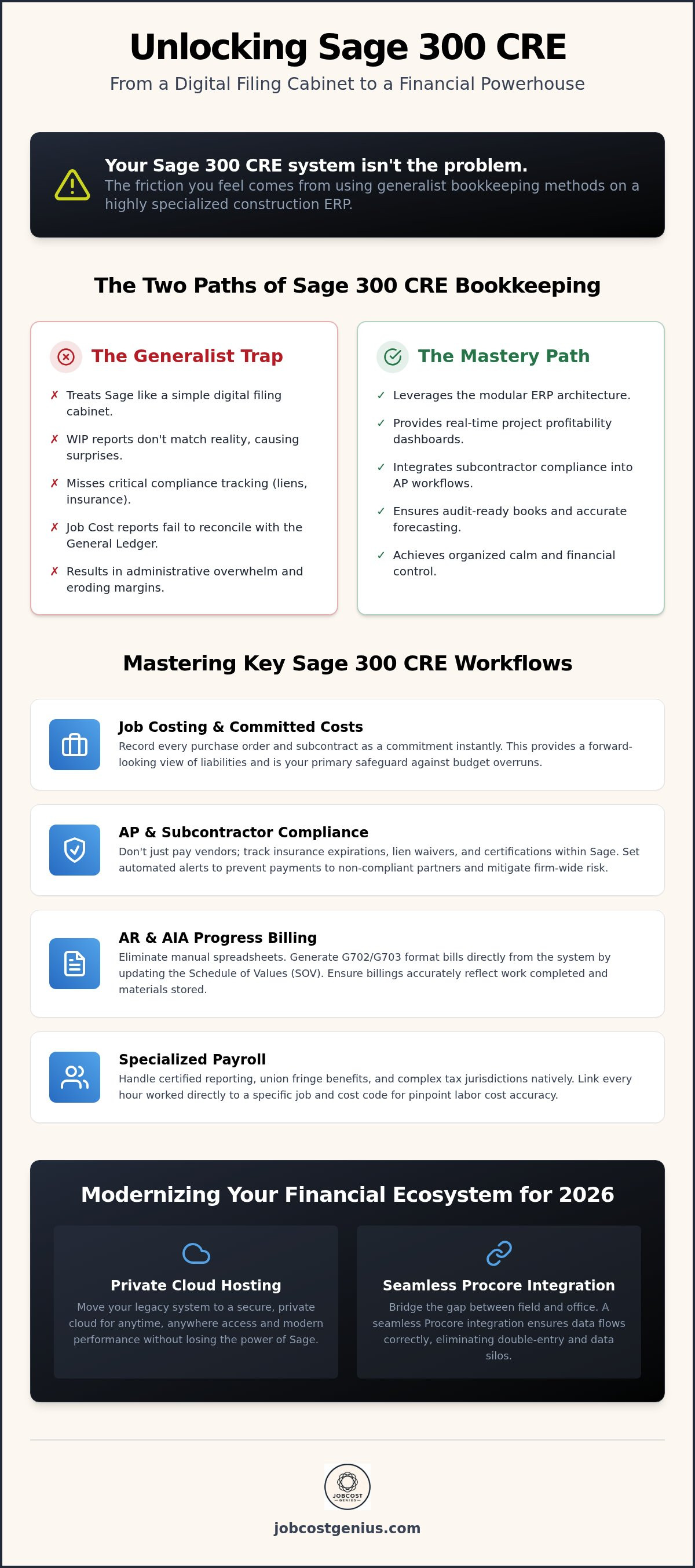
Sage 300 CRE isn't just an accounting tool; it's a modular Enterprise Resource Planning (ERP) powerhouse. While general accounting software focuses on simple debits and credits, Sage 300 CRE bookkeeping requires a deep understanding of complex job costing. Many firms fall into the "Generalist Trap." They hire a bookkeeper who excels in retail or service industries, only to find their WIP reports are a mess six months later. Standard data entry doesn't cut it here. Accuracy in this system requires a specialized eye for construction-specific workflows.
The Timberline Legacy: Understanding the ERP Architecture
The software carries the legacy of Timberline, a name synonymous with construction accounting for decades. This heritage, now managed by the Sage Group, means the system is built on a sophisticated relationship between the General Ledger and various sub-ledgers. Unlike basic software where every entry hits the GL immediately, Sage 300 CRE relies on the Job Cost module as its heart. If your bookkeeper doesn't understand how to reconcile these sub-ledgers, your financial statements won't reflect the true health of your projects. The 'Commitments' feature is another critical layer. It tracks subcontracts and purchase orders against your budget before a single cent is paid. This prevents overpayment and provides a forward-looking view of your liabilities that generalist systems simply can't match.
Construction-Specific Modules vs. Standard Accounting
Construction accounting involves unique variables that standard bookkeepers rarely encounter. Compliance tracking is a prime example. In Sage 300 CRE, you don't just pay a vendor; you track their insurance expiration, lien waivers, and safety certifications simultaneously. If a generalist ignores these prompts, your firm faces massive liability risks. Retainage is another hurdle. Standard software often lacks a built-in way to hold back a percentage of payment until project completion. Sage handles this natively, ensuring your balance sheet accurately reflects both what you owe and what is being withheld.
The Payroll module is equally specialized. It's designed for the rigors of certified reporting and union fringe benefits. A generalist might manage to cut checks, but they'll likely struggle with the complex tax jurisdictions and labor distributions required for accurate job costing. You need a process that links every hour worked directly to a specific cost code. This level of detail is the difference between a profitable project and a financial "black hole."
Essential Bookkeeping Workflows for Sage 300 CRE Mastery
Financial mastery isn't a one-time event. It's a daily discipline. Effective Sage 300 CRE bookkeeping relies on a rigorous rhythm. You must categorize transactions as they happen. Don't wait for month-end to find errors. Every Friday, the loop between field data and office records must close. This ensures your labor hours and equipment costs map to specific cost codes before the next week begins. When your field-to-office loop is tight, your project managers can make decisions based on yesterday's reality, not last month's guesses.
Job Costing and Committed Cost Tracking
Record every purchase order and subcontract as a commitment the moment they're signed. This feeds the "Cost to Complete" forecast, allowing you to see potential overruns before they happen. Committed Costs are the total value of your outstanding obligations that haven't yet been invoiced, serving as the primary safeguard against budget overruns. If these aren't tracked, your job cost reports will show a false sense of security.
Managing Accounts Payable and Subcontractor Compliance
Compliance is non-negotiable in construction. Sage 300 CRE allows you to track insurance certificates and lien waivers directly within the vendor record. Construction firms following Cost Accounting Standards (CAS) must maintain these meticulous records to ensure contract eligibility and audit readiness. Set up automated alerts for expiring credentials to prevent accidental payments to non-compliant subs. For material suppliers, use the system's joint check management features to protect your firm from double-jeopardy claims.
Accounts Receivable and AIA Progress Billing
Generating G702 and G703 format billings shouldn't require manual spreadsheets. Your bookkeeping workflows must include updating the Schedule of Values (SOV) directly within the system. This ensures that every progress billing reflects the actual work completed and materials stored on-site. Tracking retention receivables is equally vital. You don't want final project payouts to get lost in a "legacy" folder. By managing retention within Sage, you ensure that every dollar earned is eventually collected. If your current team struggles to maintain this level of detail, our Growth Plan can provide the specialized oversight you need to regain control.
Managing the lifecycle of a vendor invoice requires more than just hitting "post." You need to verify that the invoice matches the commitment and the field's receiving report. When these workflows are synchronized, your Sage 300 CRE system stops being a burden and starts being a strategic asset. It provides the clarity you need to scale your business with confidence.
Overcoming Common Sage 300 CRE Bookkeeping Obstacles
Even the most powerful engine fails if the fuel is contaminated. In the context of Sage 300 CRE bookkeeping, that fuel is your data. The most frequent obstacle contractors face is a Job Cost report that refuses to reconcile with the General Ledger. This mismatch usually happens when transactions are posted to the GL without a corresponding job cost entry, or vice versa. It creates a fog of uncertainty that makes it impossible to trust your project margins. You can't lead a firm effectively when your primary reports are constantly fighting each other.
Another major hurdle is the "Black Hole" of unallocated overhead. If your indirect costs aren't distributed across jobs using a consistent burden rate, your profitability data is skewed. This often leads to a dangerous culture of manual Excel workarounds. While a spreadsheet might feel like a quick fix, it's a secondary source of truth that inevitably leads to errors. You need your ERP to be the final word on financial health. This requires managing change orders within the system the moment they're identified, rather than waiting for the final billing cycle to catch up with reality.
Troubleshooting Data Silos Between Field and Office
A disconnect between the field and the office manifests as "surprise" expenses that hit your books weeks after they occurred. If your superintendents aren't reporting labor and material usage daily, your weekly job costs are essentially fiction. You must enforce a reporting standard that closes the data loop every Friday. For firms struggling with this manual handoff, Procore financials integration services offer a way to automate the flow of information. This ensures that field teams and accounting staff are looking at the same numbers in real time.
Fixing Discrepancies in WIP and General Ledger Reporting
Month-end closing requires a disciplined WIP reconciliation checklist. You must identify common causes of overbilling and underbilling, which often stem from timing differences between cost recognition and progress billings. Sage 300 CRE is frequently cited among the best construction accounting software because it handles these complex revenue recognition rules natively. However, the system only works if your data entry follows a strict protocol. For a deeper analysis of how to clean up your reports, refer to our guide on WIP reporting for construction companies. Mastering these discrepancies transforms your books from a source of stress into a tool for strategic growth.
Modernizing Your Sage 300 CRE Financial Ecosystem
Legacy systems often get a bad reputation for being clunky or outdated. However, the release of version 26.1 in June 2026 proves that this ERP remains a cornerstone of the construction industry. Modernizing your financial ecosystem doesn't require a total software overhaul. Instead, it requires a shift in how you feed data into the system. High-performing firms now use mobile field tools to capture labor hours and equipment usage in real time. This eliminates the Friday scramble mentioned in previous sections. By the time the weekend hits, your back-office staff already has the data needed for accurate job costing.
Automating your Accounts Payable (AP) workflow is another critical step toward efficiency. Modern Optical Character Recognition (OCR) tools can now read vendor invoices and suggest cost codes based on your historical Sage 300 CRE bookkeeping patterns. These invoices then enter a digital approval routing system. Project managers can approve costs from their tablets on-site; this ensures that the office never waits on a physical signature to post an expense. When you automate the mundane, your team can focus on high-level financial analysis.
Integrating Procore and Third-Party Tech Stacks
Connecting your ERP to a project management platform like Procore creates a bi-directional flow of information. This sync is powerful, but it's also fragile. Clean bookkeeping in Sage is the only way to prevent the dreaded "Sync Error" in Procore. If your cost codes or vendor names don't match perfectly, the data loop breaks. When maintained correctly, this integration ensures that the committed costs tracked by your field teams match the General Ledger in the office. This alignment provides a single source of truth for both the CEO and the Superintendent.
Transitioning to the Cloud: Hosting vs. Migration
In 2026, the debate isn't about whether to move to the cloud, but how. Private cloud hosting for Sage 300 CRE allows you to keep the robust features of a desktop legacy system while gaining the accessibility of a web-based app. This is often a better choice for firms that rely on deep, custom reporting that cloud-native apps sometimes struggle to replicate. A hybrid setup can serve as a stable bridge. It prepares your data for an eventual migration to platforms like Sage Intacct or Acumatica without disrupting your current operations. If you're ready to eliminate the manual data entry that slows your growth, our Procore Financials Integration service provides the bridge you need.
Professional Sage 300 CRE Oversight with JobCost Genius
Managing a growing construction firm is a high-stakes endeavor that shouldn't be stalled by administrative overwhelm. You've seen how easily data silos and reporting errors can compromise your project margins. The goal is to move your firm into a state of "Organized Calm," where financial data is a tool for growth rather than a source of stress. JobCost Genius acts as the essential bridge between your field operations and your executive dashboards. We don't just record transactions; we provide the strategic oversight necessary to ensure your Sage 300 CRE bookkeeping remains a source of truth.
Hiring a specialized internal expert is expensive and difficult given the high turnover of staff who truly understand this legacy system. We offer a way to scale your back office without the burden of increasing your fixed headcount. Our team brings over 20 years of industry experience to your firm, ensuring that we speak the language of both construction and Sage. We understand the nuances of job costing and the specific demands of the $2.2 trillion U.S. construction market. This partnership allows you to focus on winning new contracts while we maintain the foundational strength of your financials.
Expert Bookkeeping Support for Established Firms
Our Premium Plan provides the highest level of specialized oversight for firms with complex needs. We manage the intricate "Timberline" architecture so your staff doesn't have to navigate it alone. This includes reconciling sub-ledgers, managing commitments, and ensuring that every labor hour is correctly distributed. Our primary focus is keeping your financials "Bonding Ready" at all times. By maintaining audit-compliant books, we help you secure the bonding capacity and credit lines required to take on larger, more profitable projects. You'll never have to worry about a surprise discrepancy during a year-end review.
Financial Clarity Through Structured Reporting
True financial mastery comes from visibility. Every month, we deliver a structured reporting package that translates raw data into actionable insights. This includes specialized WIP Reporting that identifies overbilling and underbilling trends before they impact your cash flow. We customize dashboards to serve different stakeholders within your company. Project managers receive detailed cost-to-complete views, while business owners get a high-level look at company-wide profitability. This structured approach ensures that every decision-maker has the right information at the right time. If you're ready to transform your back office into a streamlined engine for success, you can schedule a financial health checkup with JobCost Genius today.
Building a Foundation for 2026 Growth
Mastering your financial data is no longer optional in a complex $2.2 trillion market. You've seen how specialized oversight serves as the backbone of your firm, turning digital silos into a streamlined engine for clarity. By closing the loop between the field and the office and embracing modern integrations, you gain the real-time visibility required to protect your margins. This transformation moves you away from administrative overwhelm and into a state of organized calm.
You don't have to navigate these technical complexities alone. JobCost Genius provides meticulous, industry-specific oversight backed by 20+ years of construction financial expertise. We specialize in high-level WIP reporting and Procore integration, ensuring your books are always audit-ready and compliant. It's time to stop fighting your legacy system and start leveraging it for strategic success. Scale your construction firm with expert Sage 300 CRE bookkeeping from JobCost Genius and lead your market with confidence. You've built the business; now let's build the financial mastery to sustain it.
Frequently Asked Questions
Is Sage 300 CRE the same as Sage Timberline?
Yes, Sage 300 CRE is the direct evolution of the Timberline software. Sage rebranded the product to align with their global naming conventions, but the core database structure remains specialized for construction. It remains the gold standard for complex accounting, providing the same deep job costing features that built the original brand's reputation. Modern versions like 26.1 offer enhanced security and cloud hosting capabilities while maintaining that legacy strength.
Can Sage 300 CRE handle certified payroll for federal projects?
This software includes a specialized Payroll module designed specifically for certified reporting on federal and state projects. It tracks prevailing wage rates, labor distributions, and fringe benefits required for Davis-Bacon compliance. This native automation reduces the risk of manual calculation errors. It ensures your firm remains audit-ready and compliant while working on high-stakes government contracts without needing to rely on external spreadsheets or manual workarounds. As you modernize your back office, you may notice that the agencies you serve are also adopting digital solutions like TextGov LLC to streamline their own public communications.
How do I fix a discrepancy between my Job Cost and General Ledger in Sage?
You must perform a detailed reconciliation between the Job Cost module and the General Ledger to find the source of the mismatch. Start by identifying transactions posted to the GL without a corresponding job cost entry. This often happens due to incorrect posting periods or forgotten cost codes during entry. A disciplined Sage 300 CRE bookkeeping rhythm is essential to prevent these discrepancies from distorting your WIP reports and financial statements.
Does Sage 300 CRE integrate with Procore Financials?
This ERP integrates through a robust bi-directional sync that connects field data with your back-office financial records. This integration allows project managers to see committed costs and budget updates in real time from the field. Successful implementation requires meticulous data entry to prevent sync errors and duplicated records. It provides a single source of truth for both the office and the field, significantly improving overall project visibility and decision-making.
What is the difference between Sage 100 Contractor and Sage 300 CRE?
Sage 100 Contractor is an all-in-one, integrated solution best suited for small to mid-sized firms. In contrast, Sage 300 CRE is a modular, high-performance ERP designed for larger companies with complex job costing and reporting needs. The latter offers significantly deeper customization options. It handles higher transaction volumes more effectively, making it the preferred choice for established firms managing multi-million dollar projects across various specialized divisions.
Is it possible to host Sage 300 CRE in the cloud in 2026?
Hosting the software in a private cloud environment is a common practice for modern firms in 2026. This setup provides the accessibility and security of a web-based application while maintaining the robust legacy features of the desktop version. It's an excellent choice for firms that want to modernize their infrastructure without the disruption of a full software migration. Your team can access critical financial data securely from any location.
What are the common causes of underbilling in Sage 300 CRE reports?
Underbilling usually occurs when project costs are recognized on your books before they have been invoiced to the client. This is often caused by slow field reporting or delays in the AIA progress billing cycle. Accurate Sage 300 CRE bookkeeping ensures these "costs in excess of billings" are tracked correctly on your balance sheet. This prevents cash flow gaps and provides a realistic view of project profitability throughout the job lifecycle.
Why do I need a specialized construction bookkeeper for Sage 300 CRE?
Generalist bookkeepers often lack the industry-specific knowledge to manage modular sub-ledgers and construction compliance tracking. A specialist understands the nuances of retainage, WIP reporting, and union labor distributions. This expertise ensures your data is accurate and audit-ready. It transforms your software from a digital filing cabinet into a strategic engine for financial clarity, allowing you to focus on scaling your construction firm with confidence and professional support.


