

What if the "profit" your project managers see on their spreadsheets is thousands of dollars away from the financial reality sitting in your accounting software? Discrepancies between the General Ledger and Job Cost modules are more than just a nuisance; they're a direct threat to your project's bottom line. You've likely spent hours trying to reconcile data silos between the field and the back office, only to feel overwhelmed by a sea of report options that lack clear guidance. It's a frustrating cycle that leaves many contractors guessing about their actual financial health.
This guide shows you how to master sage 300 job cost reporting to transform raw data into actionable insights and protected profit margins. We'll outline the specific workflows required for accurate Work-in-Progress (WIP) reporting and project-level profitability in 2026. You'll learn which reports actually matter for your operational goals and how to reduce your month-end closing time with absolute confidence. From leveraging version 26.1 updates to optimizing Procore integrations, we'll provide the technical clarity you need to stay organized and disciplined.
Key Takeaways
- Establish a foundation of data integrity to ensure your sage 300 job cost reporting accurately reflects the financial relationship between field operations and the back office.
- Leverage Job Overview and Cost-to-Complete reports to predict final project margins and identify financial risks long before a project ends.
- Resolve common discrepancies between the General Ledger and Job Cost modules by identifying unposted batches and eliminating administrative data silos.
- Modernize your workflow by integrating third-party tools like Procore Financials to move from manual data entry toward strategic data oversight.
- Discover how specialized construction bookkeeping simplifies Work-in-Progress (WIP) reporting and protects your firm’s profit margins.
Mastering Sage 300 CRE Job Costing: Why Data Integrity Matters
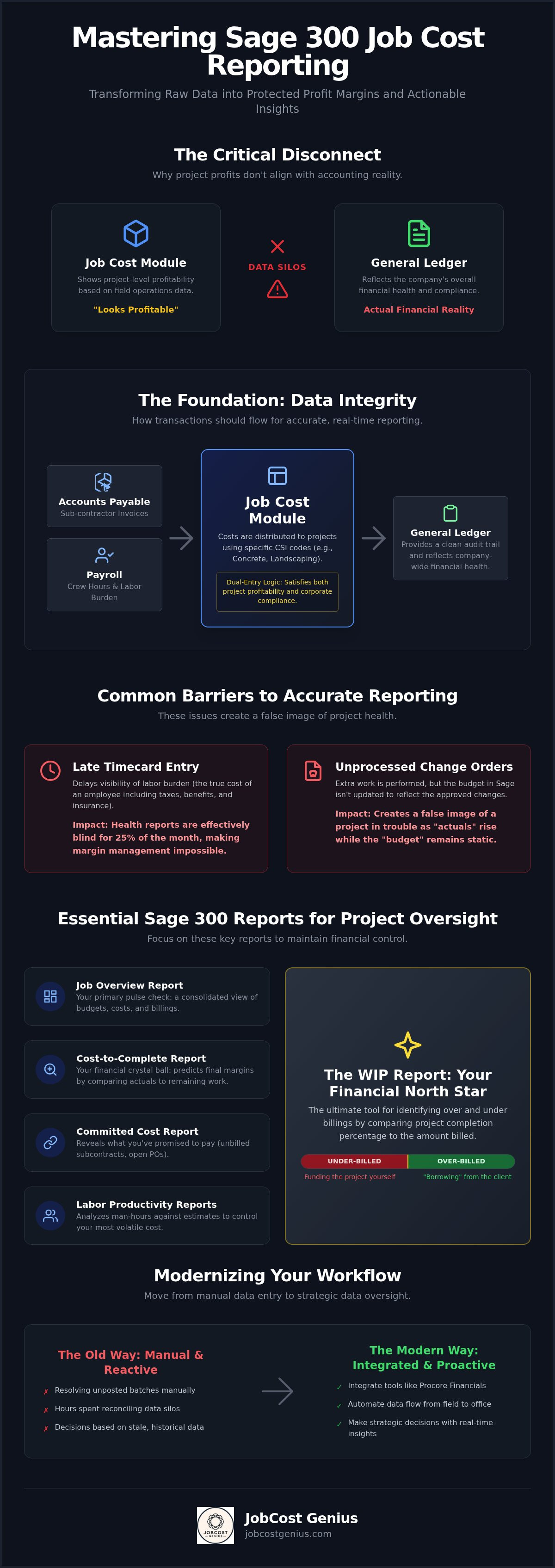
Sage 300 Job Costing functions as the essential bridge between field project management and back-office accounting. It isn't just a module; it's a specialized environment where operational reality meets financial record-keeping. Effective sage 300 job cost reporting relies on the seamless flow of data between these two worlds. When this bridge fails, project managers make decisions based on gut feelings while the accounting team reconciles historical ghosts.
Generalist bookkeepers often struggle with the JC-GL relationship because they treat them as independent ledgers. In a construction context, every transaction must satisfy both the general ledger for corporate compliance and the job cost module for project profitability. This dual-entry logic is rooted in fundamental cost accounting principles that prioritize the allocation of expenses to specific production activities. Without this specialized focus, your data becomes stale. Stale data in construction is expensive. It hides labor overruns and material price hikes until it's too late to course-correct, turning potential growth into a liquidity crisis.
The Relationship Between Job Cost and General Ledger
Transactions flow into the Job Cost module primarily through Accounts Payable and Payroll. When a sub-contractor invoice is entered or a crew's hours are processed, Sage 300 distributes those costs based on specific CSI codes. These codes ensure that money spent on "Concrete" doesn't accidentally get buried in "Landscaping" reports. Consistent coding is the only way to maintain a clean audit trail between the field and the office.
Precision at this level requires a robust construction chart of accounts designed specifically for the industry. This foundation allows Sage to map field expenses to the correct financial categories automatically. Without this structural alignment, your sage 300 job cost reporting will always feel like a manual puzzle rather than a streamlined process. Accurate mapping ensures that every dollar spent on the job site is reflected in the company's overall financial health.
Common Barriers to Accurate Reporting
Timeliness is the greatest enemy of data integrity. Late timecard entry remains a primary barrier, as it delays the visibility of labor burden; the true cost of an employee including taxes, benefits, and insurance. If labor costs aren't posted weekly, your project health reports are effectively blind for 25% of the month. This delay makes it impossible to manage margins effectively.
Unprocessed change orders also skew budget-to-actual comparisons. When the field performs extra work without a signed change order reflected in Sage, the "actuals" rise while the "budget" stays static, creating a false image of a project in trouble. Ultimately, data integrity in Sage 300 is the precise alignment of field costs with office records to ensure every dollar is accounted for in real time.
Essential Sage 300 Reports for Project Oversight
Effective sage 300 job cost reporting isn't about the quantity of data you generate; it's about the relevance of that data to your project's lifecycle. While Sage 300 CRE offers hundreds of standard formats, most contractors only need a handful of core reports to maintain financial control. The Job Overview Report serves as your primary pulse check, providing a consolidated view of budgets, costs, and billings across every active contract. For deeper insight, the Cost-to-Complete report functions as a crystal ball, allowing you to predict final margins by comparing current actuals against the remaining work before the project ends.
Financial exposure is often hidden in unbilled subcontracts and open purchase orders. This makes the Committed Cost Report non-negotiable for any firm managing complex supply chains. It reveals exactly what you've promised to pay, ensuring your "available budget" isn't a false number. Additionally, Labor Productivity Reports analyze man-hours against the original estimate. Since labor is typically the most volatile variable in construction, tracking these hours in real time prevents minor field delays from becoming major financial losses.
The WIP Report: Your Financial North Star
The Work-in-Progress (WIP) report is the ultimate tool for identifying over and under billings. By comparing the percentage of completion against the amount billed, Sage 300 determines if you are "borrowing" from the client or funding the project yourself. This calculation is vital for construction cash flow management, as it prevents the "profit fade" that occurs when billings get ahead of actual production. Professional organizations like the Construction Financial Management Association (CFMA) emphasize that a balanced WIP is the hallmark of a stable, bankable firm. Use this monthly checklist for reconciliation:
- Verify that the total cost on the WIP report matches the Job Cost ledger exactly.
- Review all projects with high under-billings to ensure change orders are correctly posted.
- Confirm that the estimated cost at completion is updated monthly by the project manager.
Customizing Reports for Project Managers
Project managers often ignore reports that are cluttered with "accounting noise" like overhead allocations or corporate tax codes. To drive accountability, customize your sage 300 job cost reporting to focus exclusively on Job Cost Totals that field staff can actually control. Providing PMs with real-time access to their specific budgets ensures they take ownership of the numbers. If your team struggles to pull these insights manually, you might benefit from specialized WIP reporting services that automate and streamline the entire distribution process.
Troubleshooting Common Sage 300 Reporting Gaps
It's a common frustration in the construction office: you run a report and the numbers simply don't add up. Discrepancies in sage 300 job cost reporting often stem from a lack of synchronization between operational modules and the financial core. The most frequent culprit is the "missing" cost, which usually isn't missing at all; it's simply trapped in an unposted batch. These unposted transactions create a dangerous blind spot, making a project appear more profitable than it actually is until the month-end crunch reveals the truth.
Managing retention also presents a significant reporting hurdle. If retention isn't properly tracked through the accounts receivable and payable modules, your reported project revenue can be artificially deflated. This leads to inaccurate cash flow projections and strained relationships with subcontractors. Additionally, when miscoded entries occur, the temptation is to "fix" them with a quick manual entry. However, correcting errors without using the proper "Move Transactions" function breaks the audit trail and makes future reconciliations nearly impossible.
Fixing GL vs. JC Discrepancies
When your Job Cost totals don't match the General Ledger, you need a methodical approach to find the leak. Start by running the Reconciliation Report within the Job Cost module. This report identifies transactions that hit one ledger but not the other. Most often, the issue is a manual GL entry made by an accountant who didn't realize that Sage 300 requires a job link for every project-related expense. Reconciliation should be a weekly, not monthly, task to prevent these small errors from snowballing into year-end nightmares.
- Run the "JC Reconciliation Report" to identify unlinked entries.
- Check the "Entry Info" in the General Ledger for transactions without a Job ID.
- Identify any "Direct Costs" entered in GL that bypass the JC module entirely.
Change Order Management and Budget Accuracy
Budget accuracy hinges on how you handle change orders. Sage 300 distinguishes between "Pending" and "Approved" change orders, and your sage 300 job cost reporting must reflect this distinction clearly. Including pending amounts in your "Revised Budget" column creates a false sense of security; it assumes revenue that hasn't been legally committed yet. Only approved change orders should move into the revised budget to ensure your cost-to-complete ratios remain grounded in reality.
Internal change orders, or budget transfers between cost codes, are equally important. If a PM moves money from "Site Work" to "Concrete" without documenting the transfer in Sage, your cost-to-budget analysis will show a phantom overrun in one category and a false surplus in another. Keeping these transfers documented ensures that your budget remains a living, accurate document throughout the project lifecycle.
Modernizing Your Sage 300 Reporting Workflow
Contractors often face pressure to abandon their legacy ERP systems in favor of newer, cloud-native platforms. This is a costly and often unnecessary transition. You don't need to migrate your entire financial infrastructure to achieve modern visibility. Instead, the focus should shift toward extending the life of your current system through strategic optimization. Modernizing your sage 300 job cost reporting workflow allows you to maintain the robust calculation engine you trust while gaining the real-time insights your project managers demand.
The goal is to move from a state of constant data entry into a role of data oversight. Automating report delivery via scheduled tasks ensures that stakeholders receive the information they need without manual intervention from the accounting team. This structured approach reduces administrative friction and ensures that project health checks become a consistent part of your operational rhythm. By utilizing the built-in report distribution tools in Sage 300 CRE, you can push critical WIP and cost-to-complete data to PMs on a weekly basis, fostering a culture of financial accountability.
Field-to-Office Sync: Sage 300 and Procore
Integrating Sage 300 with project management tools creates a seamless flow of information. A Procore financials integration solves the field-to-office gap by pushing commitments and costs directly into your accounting module. This eliminates the need for double-entry and drastically reduces manual errors. When field staff and office staff work from a single source of truth, project financials remain accurate and actionable. Real-time cost tracking from the job site ensures that labor overruns are identified immediately, not three weeks later when the invoices arrive. This level of synchronization protects your profit margins by catching discrepancies before they impact your cash flow.
The Shift to Cloud-Enabled Legacy Systems
Hosting Sage 300 for remote access is another essential step in modernization. Moving your on-premise server to a hosted environment improves reporting speed and allows your team to collaborate from any location. This shift supports better digital record-keeping, which is critical for preparing for future audits. By leveraging modern bookkeeping services that specialize in legacy complexity, you can maintain a high-performance system without the overhead of internal IT management. Organized digital records ensure that compliance becomes a byproduct of your workflow rather than a separate, stressful task. If you're ready to stop fighting your software, you can modernize your Sage 300 workflow with professional support today.
Expert Sage 300 Bookkeeping: The JobCost Genius Advantage
Generalist bookkeeping services often treat Sage 300 CRE like a standard retail accounting package. This approach fails because it ignores the technical nuances of the construction industry. At JobCost Genius, we act as a disciplined partner for national contractors who need more than just data entry. Our professionals bring over 20 years of industry experience to every engagement, ensuring that your sage 300 job cost reporting is built on a foundation of technical accuracy. We understand that your software should be a strategic asset, not an administrative burden that keeps you from the job site.
We offer tiered service levels designed to scale with your business's complexity. Our Starter Plan provides essential support for growing firms, while the Growth and Premium Plans offer deeper technical oversight for contractors needing enterprise-level tech support and advanced system management. By offloading the technical maintenance of Sage to experts, you transform your financial data into a reliable tool for strategic decision-making. This transition allows you to move away from reactive troubleshooting and toward proactive project management.
Strategic Financial Oversight
Clean monthly record-keeping is the only way to ensure your financial reports remain accurate throughout the year. We provide specialized WIP (Work in Progress) reporting that meets the rigorous requirements of bonding agents and banking institutions. This oversight is tailored to your specific niche, whether you operate as a General Contractor managing complex sub-tiers or a Subcontractor focused on unit-price production. Our team ensures that your sage 300 job cost reporting reflects the true percentage of completion, protecting your firm from the "profit fade" that occurs when billing gets ahead of production. This level of meticulousness ensures that your project managers always have a clear view of their remaining budget.
Reducing Administrative Overwhelm
The administrative weight of AP, AR, and Payroll can paralyze a construction office. We manage these workflows with meticulous attention to detail, ensuring that every cost is coded correctly the first time. This includes maintaining prevailing wage payroll compliance directly within your Sage environment. By trusting industry veterans with your back-office operations, you gain the organized calm necessary to focus on building. We handle the complexities of legacy systems and Procore financials integration so you don't have to. If you're ready to achieve financial clarity and foundational strength, schedule a strategy session with JobCost Genius today.
Securing Your Project Margins through Technical Precision
Mastering your financial data doesn't require a total software overhaul; it requires a commitment to technical precision. By prioritizing data integrity and establishing a weekly reconciliation rhythm, you transform sage 300 job cost reporting from a stressful administrative task into a strategic growth driver. Accurate WIP analysis and seamless field-to-office integrations ensure that your project margins remain protected against the volatility of the construction industry.
JobCost Genius acts as your disciplined guide through these complexities. Our team consists of industry veterans with over 20 years of construction accounting experience. We specialize in high-stakes WIP reporting and complex software integrations to ensure your legacy systems perform at peak efficiency. You don't have to manage these technical burdens alone.
Get Expert Sage 300 Financial Oversight Today and reclaim the time you need to focus on building. With the right foundation, your firm is ready for a profitable 2026.
Frequently Asked Questions
How do I run a WIP report in Sage 300 CRE?
Navigate to the Job Cost module and select the Reports menu to find the Work in Progress options. Most users prefer the WIP Report with Over Under Billings format to see accurate percentage of completion data. You must ensure all costs and billings are posted for the period before running the report. If your internal team finds this process manual, JobCost Genius offers specialized WIP reporting as part of our tiered service plans.
Why does my Job Cost total not match my General Ledger in Sage 300?
Discrepancies usually occur when manual entries are made directly into the General Ledger without a corresponding Job ID. Another common culprit is unposted batches in the Accounts Payable or Payroll modules. These transactions sit in a new file rather than the current file, creating a mismatch in your sage 300 job cost reporting. You should use the Reconciliation Report to identify these unlinked transactions and move them into the correct project record.
Can Sage 300 CRE integrate with modern project management software like Procore?
Yes, Sage 300 CRE integrates seamlessly with Procore through the Procore Financials Integration. This connection allows for the bi-directional sync of commitments, job costs, and change orders between the field and the office. It eliminates the need for double entry and reduces the risk of human error. Our team specializes in managing these integrations to ensure your project managers and accountants are always looking at the same set of financial data.
What are the most important job cost reports for a construction business owner?
The most critical reports include the Job Overview, Cost-to-Complete, and the WIP Report. The Job Overview provides a high-level summary of contract totals and billings, while the Cost-to-Complete predicts final margins before the project ends. For owners focused on cash flow, the Committed Cost report is essential for tracking outstanding subcontracts and purchase orders. These reports provide the foundational strength needed to make informed, strategic decisions about your company's growth.
How often should I reconcile my job costs in Sage 300?
You should reconcile your job costs against the General Ledger at least once a week. Waiting until the month-end close often leads to administrative overwhelm as errors accumulate and become harder to trace. Weekly reconciliations allow you to catch miscoded entries or unposted batches in real time. This disciplined approach ensures your sage 300 job cost reporting remains accurate, providing project managers with the reliable data they need to manage their site budgets effectively.
Is Sage 300 CRE still a viable reporting tool in 2026?
Sage 300 CRE remains a powerful and viable tool in 2026, especially with the release of version 26.1. While it is a legacy system, its robust calculation engine is still the industry standard for complex cost accounting. Many contractors choose to optimize their current setup rather than undergo a risky migration. By leveraging modern hosting and expert bookkeeping support, you can extend the life of the software while maintaining high-performance reporting capabilities.
How do I track committed costs in Sage 300?
Committed costs are tracked through the Purchase Order and Subcontract Management modules. When you issue a PO or a subcontract, Sage 300 tags these as committed until an invoice is received and posted. You can run the Committed Cost Report in the Job Cost module to see the total amount of outstanding obligations. This report is vital for understanding your true available budget and preventing over-spending on materials or labor during the production cycle.
What is the difference between Sage 100 Contractor and Sage 300 CRE reporting?
Sage 100 Contractor is designed for smaller firms and offers a more streamlined, all-in-one reporting experience. In contrast, Sage 300 CRE is a modular system built for larger contractors with complex requirements like multi-entity accounting and high-volume WIP reporting. Sage 300 offers deeper customization and more robust audit trails, making it the preferred choice for enterprise-level oversight. The reporting in Sage 300 requires a higher level of technical expertise to manage effectively.


