

Did you know the average construction business waits 83 days to receive payment for completed work? While you're managing complex builds, your capital is often tied up in a cycle of administrative bottlenecks and field-to-office discrepancies. Most industry veterans accept these delays as an inevitable cost of doing business, yet 82% of contractors still report waiting more than 30 days past their expected payment dates. You likely feel the constant pressure of chasing invoices while trying to maintain project momentum.
Realizing a meaningful construction billing process improvement requires moving beyond manual spreadsheets and fragmented data. This guide provides a strategic roadmap to transition from reactive invoice chasing to a streamlined, automated billing ecosystem. You'll discover how to leverage modern financial infrastructure to protect your cash flow and ensure compliance with new 2026 prompt payment laws. We will examine the shift toward integrated project management, the necessity of accurate WIP reporting, and how specialized financial systems create the organized calm and financial clarity your back office deserves.
Key Takeaways
- Identify the hidden administrative bottlenecks and revenue leakages that consume executive time and erode project margins.
- Learn the specific phases required for a successful construction billing process improvement, from auditing your tech stack to standardizing your Chart of Accounts.
- Evaluate the critical differences between standalone software tools and expert-managed services to ensure your financial data remains accurate and scalable.
- Understand how to link automated billing directly to your WIP reporting to eliminate overbilling and underbilling surprises at month-end.
- Discover how a digital-first billing ecosystem helps your firm comply with new 2026 prompt payment mandates while accelerating overall cash flow.
The Hidden Costs of Manual Billing in Modern Construction
Manual billing is often the heaviest anchor slowing down a growing firm. Executives frequently find themselves trapped in a cycle of data entry, spending 20 or more hours every week manually inputting field data into spreadsheets. This administrative drag doesn't just waste time; it prevents leadership from focusing on high level strategy. When project managers are buried in paperwork, they have less time to manage the actual build. This leads to employee burnout and high turnover in the back office, as talented staff grow frustrated with repetitive, low value tasks.
Revenue leakage is another silent killer of profitability. In an industry where a 10% margin is often the goal, missing even a single change order can be catastrophic. Manual systems are notorious for losing track of field variations, meaning work gets done but never gets billed. This makes a meaningful construction billing process improvement essential for protecting your bottom line. Without automation, you're essentially leaving money on the table while your overhead continues to climb.
Slow billing cycles also increase the cost of capital. When cash is tied up in unbilled work, firms often rely on expensive lines of credit to cover payroll and materials. This interest expense further erodes your margins. It's a preventable financial leak that stems directly from an inefficient back office infrastructure. To further protect cash flow, some contractors use specialized financing from Zip-Loan for essential overhead like fleet repairs, ensuring their main capital remains focused on project delivery.
Cash Flow Bottlenecks and Payment Delays
The gap between work completion and invoice submission is the most dangerous phase for your cash flow. Manual systems struggle to keep pace with field progress, leading to weeks of delay before a client even sees a bill. This creates a domino effect. Late payments from clients mean you can't pay vendors on time, costing you valuable supplier discounts and damaging professional relationships. To mitigate these delays, many firms leverage smartAR to manage their receivables and access flexible fee funding. Additionally, manual tracking often fails to account for retention. Thousands of dollars can sit in limbo for months simply because there isn't a clear system to trigger its release at project milestones.
Compliance Risks and Audit Vulnerability
Missing documentation is a major liability during workers' comp or insurance audits. If you can't quickly produce a clear record of payments and work orders, you face significant financial penalties. This lack of organization makes following a 2026 construction accounting guide for small firms nearly impossible to execute. An audit trail is the digital footprint of every financial transaction. Without an automated system, maintaining this footprint is a constant, manual struggle that leaves you vulnerable to regulatory scrutiny and project disputes.
What Are Automated Construction Billing Solutions?
An automated construction billing solution is a digital ecosystem designed to sync field data directly with accounting software for seamless invoicing. It moves beyond simple document generation. By creating a direct link between the job site and the back office, these systems ensure that every dollar of work performed is captured accurately. This shift is the foundation of a successful construction billing process improvement strategy. It replaces the traditional paper-heavy workflow with a streamlined digital pipeline.
The core functionality centers on moving from physical paper tickets to digital work orders with real-time approvals. This provides a Single Source of Truth for project financials; project managers and accountants no longer argue over which version of a spreadsheet is current. These solutions also automate technical industry standards, such as AIA G702 and G703 forms. By pre-populating these complex documents with verified field data, the risk of rejection by architects or owners decreases significantly.
Automated Progress Billing and Claims
Progress billing relies on accurate data regarding the percentage of work completed. Automated systems calculate these values based on real-time field reporting rather than rough estimates. This precision ensures that you aren't underbilling for work performed or overbilling and creating future cash gaps. Automated retention tracking is equally vital for long-term project health. The system monitors the 5% or 10% held back on each claim, ensuring these funds are recovered promptly at project close. This streamlines the approval workflow, reducing the friction that often exists between project managers and the accounting department.
Integration with Field Management Software
For high-growth firms, Procore financials integration services represent the gold standard for data accuracy. These services bridge the gap between field-heavy tools and accounting platforms like Sage 300 CRE or QuickBooks. Mobile-first tools allow foremen to document progress and bill as they build. When field data flows directly into your billing cycle, the administrative burden disappears. If you're looking to scale without adding more back-office staff, exploring a managed billing approach can help you implement these integrations with professional precision.
Software-Only vs. Managed Billing Services: Which Is Right for You?
Many contractors view software as a magic bullet. They purchase a high-end subscription, expecting it to solve their cash flow issues immediately. However, without a disciplined process, you simply automate existing errors. This is the "Software Trap" where garbage in leads to garbage out. A true construction billing process improvement requires more than just a login; it requires a structured financial workflow and industry-specific oversight to ensure data integrity.
Consider the scalability of your back office. Hiring a full-time in-house controller is a significant investment. Salaries often reach six figures when benefits and payroll taxes are included. In contrast, outsourced bookkeeping for construction firms provides high-level expertise at a predictable monthly rate. While software subscription fees are part of the equation, the hidden cost is the time your staff spends managing the tool. Managed services bridge this gap by providing both the technical infrastructure and the expert talent to run it.
The Limitations of Generalist Automation Tools
Generalist bookkeeping tools often fail because they don't account for the unique complexities of the trades. They rarely handle construction-specific labor burden or equipment job costing accurately. There's a high risk of miscategorized transactions when automation runs without human oversight. Generalist providers often miss the critical nuances of prevailing wage payroll processing for contractors. One reporting error can lead to massive fines or project disqualification. You need a system that understands the difference between a simple expense and a job-costed liability.
The Managed Service Advantage
JobCost Genius combines specialized software with over 20 years of industry experience to protect your margins. This partnership ensures your data isn't just processed but interpreted strategically. We understand the difference between a simple invoice and a complex progress claim. A managed service allows for an organized calm that DIY rollouts rarely achieve. Implementing a managed service is significantly faster than a DIY rollout because the processes and integrations are already built and tested. You gain immediate access to a seasoned team that treats your financial infrastructure as a strategic asset rather than just a digital file cabinet.
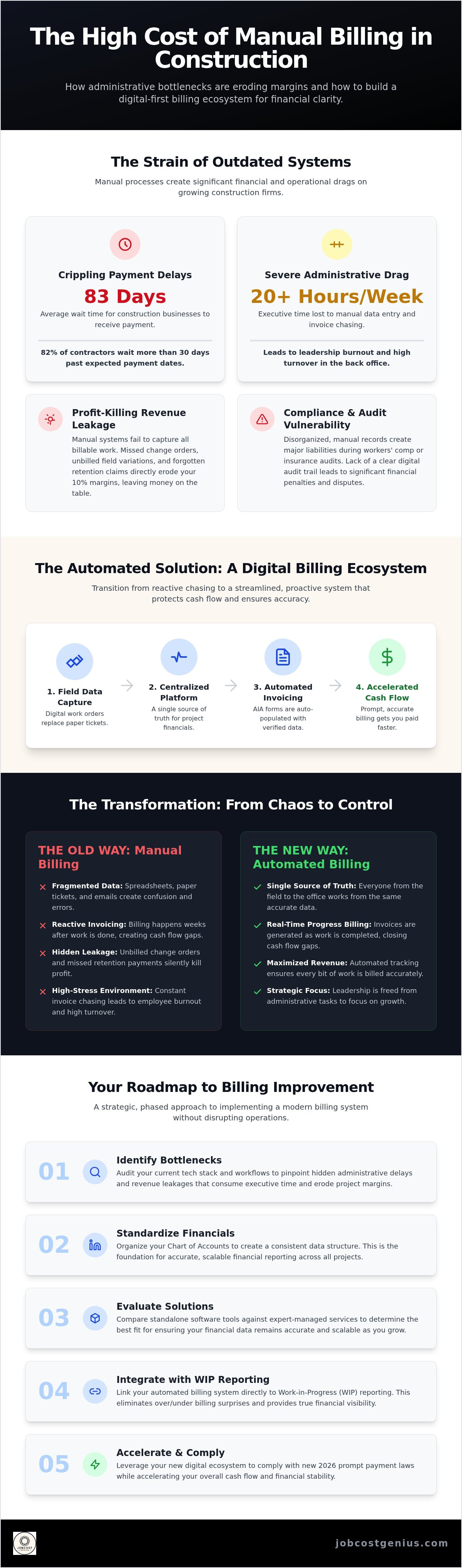
How to Implement Automated Billing Without Disrupting Operations
Transitioning to an automated system shouldn't feel like rebuilding a bridge while traffic is still moving. It requires a tiered, methodical approach. First, you must assess your current tech stack. If you're using QuickBooks for accounting and Procore or Buildertrend for field management, your priority is ensuring these systems speak the same language. Second, you need to standardize your Chart of Accounts. Automation relies on consistent logic; if your categories are fragmented, your reports will be too. This standardization is a foundational step in any successful construction billing process improvement. Third, train your field team on digital documentation. They must understand that a photo attachment or a digital signature for a change order is the direct trigger for getting the company paid. Finally, establish a weekly Billing Review. This human oversight ensures that the automation is performing correctly before any invoices reach your clients.
Standardizing the Field-to-Office Data Flow
The gap between the job site and the office is where most revenue disappears. You must set clear expectations for daily logs and time tracking. If a foreman waits until Friday to log hours, accuracy drops and billing delays follow. You also need a defined process for exceptions. While automation handles the bulk of your claims, complex unit-price contracts may still require manual intervention. Use automated workflows to capture change orders the moment they're identified in the field. Capturing a digital signature on a mobile device before work begins prevents disputes and ensures that every variation is accounted for in the next billing cycle.
Protecting Your Cash Flow During Transition
Don't retire your manual spreadsheets on day one. Run parallel systems for at least one full billing cycle to verify that the automated outputs match your verified manual calculations. Monitor your Accounts Receivable (AR) closely during the first 30 days of the new system. Look for any friction points where client approvals might be slowing down. It's also helpful to communicate the change to your clients early. Explain that the new digital format provides better transparency and more detailed documentation. This proactive approach builds trust and ensures your cash flow remains steady as you upgrade your financial infrastructure. If you're ready to move away from administrative overwhelm, our experts can help you optimize your financial tech stack for long-term growth.
Beyond Invoicing: How Automated Billing Powers WIP Reporting
Billing automation is the engine that drives accurate WIP reporting for construction companies. When your billing data is real-time and precise, your Work in Progress reports reflect the true state of your projects. This integration is the final piece of a successful construction billing process improvement. It eliminates the common month-end stress of discovering significant overbilling or underbilling discrepancies. By syncing your progress claims with actual job costs, you gain a clear view of your earned revenue versus your actual expenditures.
Accurate WIP data is also a powerful tool for business growth. Sureties and lenders prioritize contractors who can produce bank-ready financial statements on demand. High-quality reporting allows you to secure higher bonding limits and better loan terms, which are essential for bidding on larger, more lucrative contracts. You move from historical reporting, which only tells you what happened in the past, to predictive forecasting. This foresight allows you to adjust your bidding strategy based on real performance data rather than guesswork.
Protecting Your Profit Margins with Real-Time Data
Manual systems often hide project slippage until it's too late to intervene. With automated data, you can identify a budget overrun in week two instead of discovering the loss in month four. JobCost Genius utilizes this automated information to provide executive-level dashboards that highlight your most critical financial metrics. Automated billing solutions prevent profit fade by providing real-time tracking that matches actual costs against progress claims as they occur. This level of visibility ensures that your project margins remain protected throughout the entire build cycle.
The JobCost Genius Solution: Starter to Premium
Our tiered services are designed to scale with your firm's needs. The Starter Plan builds the essential foundation for automated record keeping, ensuring your basic financial data is clean and organized. As your operations expand, our Growth Plan and Premium Plan offer advanced technical support and specialized Procore Financials integration help. These higher-tier plans provide the sophisticated infrastructure needed to manage complex project portfolios with ease. Moving from administrative overwhelm to financial clarity is a strategic choice that positions your business for long-term stability. You can finally stop chasing invoices and start leading your company with confidence.
Building a Foundation for Scalable Growth
Achieving a sustainable construction billing process improvement is no longer a luxury for firms looking to scale; it's a fundamental shift from administrative overwhelm to a state of organized financial clarity. By integrating field data with specialized accounting workflows, you protect your project margins and eliminate the month-end surprises that derail profitability. This guide has outlined how moving beyond paper-based systems toward automated ecosystems secures your cash flow and enhances your bonding capacity.
JobCost Genius brings over 20 years of industry experience to help you navigate this transition. Our team provides national service coverage for contractors, offering specialized Procore Financials Integration and disciplined oversight that software alone can't provide. You don't have to manage the complexities of 2026 prompt payment laws or predictive WIP reporting on your own. Our experts act as your strategic partner, ensuring your financial infrastructure is as solid as your builds.
Ready to automate your back office? Explore JobCost Genius Pricing Plans and take the first step toward a more predictable financial future. Your growth depends on a strong infrastructure. Let's build it together.
Frequently Asked Questions
What is automated construction billing software?
Automated construction billing software is a digital ecosystem that connects job site activities directly to your financial back office. It eliminates manual data entry by syncing field reports, time tracking, and change orders with your accounting platform. This technology ensures that every hour worked and every material used is captured for invoicing in real-time. By removing paper tickets from the workflow, firms achieve a significant construction billing process improvement that reduces errors and protects project margins.
How does automation improve construction cash flow?
Automation improves cash flow by drastically reducing the time between work completion and invoice submission. Traditional manual cycles often take weeks to process, but digital systems allow for same-day billing. This speed is critical when the industry average for payment is 83 days. Faster invoicing triggers earlier payment windows and ensures compliance with 2026 prompt payment laws. Consequently, firms maintain higher liquid capital and avoid relying on expensive lines of credit to cover payroll.
Does automated billing replace my bookkeeper?
Automated billing doesn't replace the need for professional oversight; instead, it eliminates the low-value manual tasks that consume a bookkeeper's time. It allows your financial team to focus on high-level analysis and strategic reporting. While the software handles data flow, a human expert must still verify transaction categorization and job costing logic. Many firms choose a managed service to gain access to specialized industry knowledge that software alone cannot provide.
Can these solutions handle AIA G702 and G703 billing?
Yes, specialized construction billing solutions are designed specifically to handle the complexities of AIA G702 and G703 forms. These systems automatically pull data from your project budget and progress reports to populate the required schedule of values. This automation reduces the risk of rejection by architects or owners due to mathematical errors or formatting issues. It ensures your progress claims are accurate, consistent, and submitted on time to maintain steady project funding.
How long does it take to implement an automated billing system?
The implementation timeline typically ranges from 30 to 90 days depending on the complexity of your current tech stack. Phase one involves auditing your existing software, such as QuickBooks or Procore, to ensure clean data migration. During the first billing cycle, we recommend running parallel systems to verify that automated outputs match your manual records. This methodical approach ensures a smooth transition without disrupting your current cash flow or vendor relationships.
What is the difference between a software tool and a managed service?
A software tool provides the digital infrastructure, but you are still responsible for managing the data and processes. A managed service combines that technology with the expertise of seasoned industry veterans. We don't just give you a login; we manage the categorization, reconciliations, and reporting for you. This partnership ensures that your construction billing process improvement is handled with professional precision rather than trial and error, allowing you to focus on building.
How does automated billing impact my WIP reports?
Automated billing provides the real-time data necessary for accurate WIP reporting. When invoices and job costs are synced instantly, your Work in Progress reports reflect the true financial health of every project. This visibility eliminates the profit fade that often occurs when underbilling isn't identified until month-end. Accurate, automated WIP reports are essential for securing higher bonding limits and providing bank-ready financial statements to lenders and stakeholders during audits or loan applications.
Will my field team actually use a digital billing system?
Field teams are more likely to adopt digital systems when they are mobile-first and integrated into their daily routines. Modern solutions allow foremen to log hours and document change orders directly from their phones, which is often faster than filling out paper tickets. By simplifying the documentation process and providing immediate field-to-office communication, you reduce the administrative burden on your project managers. Clear training and standardized digital workflows are key to successful long-term adoption.


