

What if your upcoming software transition is actually a financial audit in disguise? For most firms, a construction software data migration feels like a high stakes gamble with years of historical job cost data on the line. You've likely spent years refining your numbers; the thought of losing that continuity or seeing your WIP reports break during the move is enough to stall any digital upgrade. It's a valid concern because digitizing existing administrative chaos only leads to faster, more expensive failures.
We understand the anxiety of managing this transition while keeping your daily operations running. This 2026 guide provides a structured roadmap to move your data without compromising your financial integrity or disrupting your cash flow. You'll learn how to achieve a clean start in your new system while maintaining absolute continuity in your project profitability tracking. We will walk through the essential steps to protect your AP/AR workflows and ensure your new software provides the financial clarity your business needs to scale with confidence.
Key Takeaways
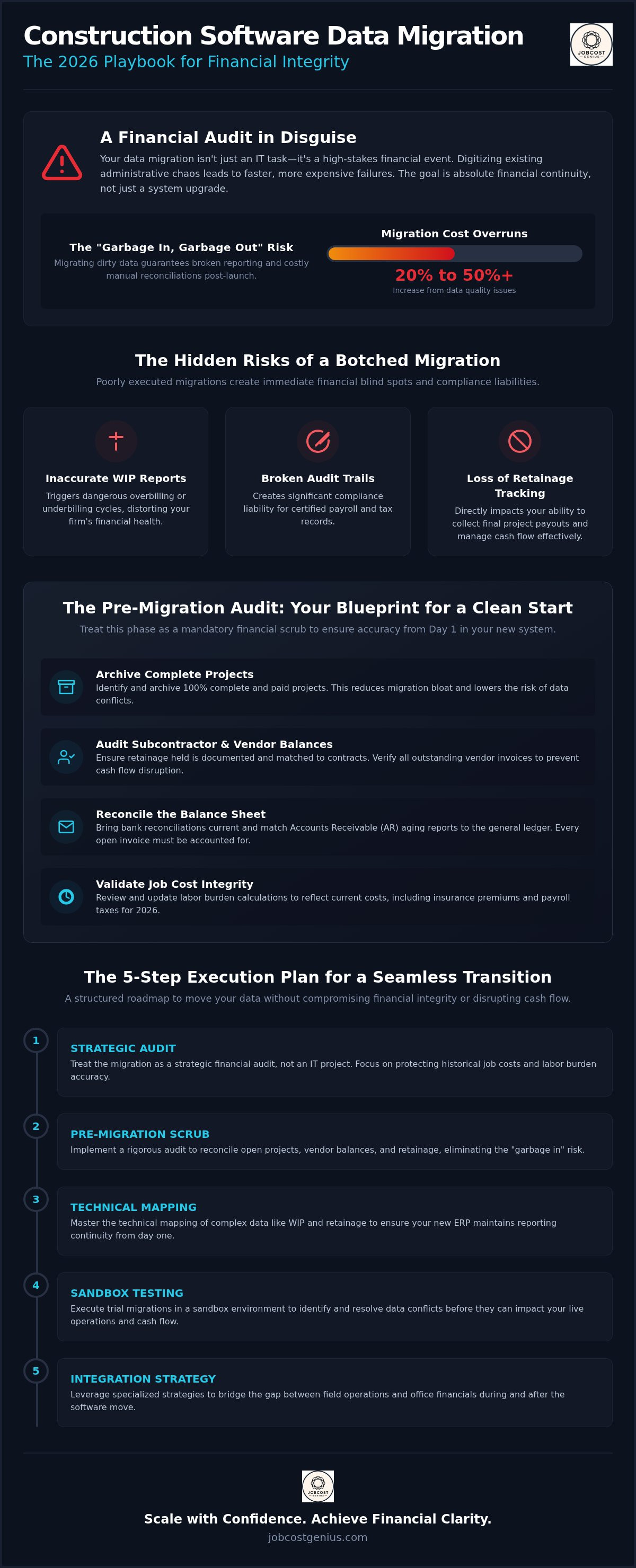
- Treat your construction software data migration as a strategic financial audit to protect historical job costs and labor burden accuracy.
- Implement a rigorous pre-migration audit to reconcile open projects and eliminate the "garbage in, garbage out" risk in your new system.
- Master the technical mapping of WIP and retainage to ensure your modern ERP maintains reporting continuity from day one.
- Execute a structured transition plan using trial sandbox phases to identify and resolve data conflicts before they impact your cash flow.
- Leverage specialized integration strategies to bridge the gap between field operations and office financials during and after the software move.
Why Construction Data Migration is a Financial Event, Not Just an IT Task
Construction software data migration is the systematic transfer of project records and financial data from a legacy system to a modern platform. While IT teams often focus on the technical data migration process, for a construction firm, this is primarily a financial event. Your data is your history. It represents every dollar spent on labor, every cent held in retainage, and every hour of equipment usage. Moving this information incorrectly doesn't just lose files; it erases your firm's financial institutional knowledge.
Construction data is uniquely complex. Unlike standard retail or service accounting, our industry relies on Work in Progress (WIP) reporting and specialized labor burdens. If these metrics don't transfer with absolute accuracy, your balance sheet becomes a fiction. In 2026, the cost of carrying over "dirty data" is higher than ever. Research indicates that migration projects can see cost increases of 20% to 50% when data quality issues force manual reconciliations after the move. The ultimate goal is financial continuity. You need reporting accuracy from Day 1 to ensure that your project profitability tracking remains unbroken.
The Hidden Risks of Poor Migration
A botched migration creates immediate financial blind spots. You might lose the ability to compare current job costs against historical benchmarks, making it impossible to spot budget overruns early. Poorly executed migrations often result in:
- Inaccurate WIP reports that trigger dangerous overbilling or underbilling cycles.
- Broken audit trails for certified payroll and tax records, creating significant compliance liability.
- Loss of retainage tracking, which directly impacts your ability to collect final project payouts.
The Strategic Opportunity of a Fresh Start
Don't just move your mess. A construction software data migration is the perfect time to audit your internal processes. It's an opportunity to clean a cluttered Chart of Accounts and standardize vendor and subcontractor records. By refining your data structure during the move, you implement better financial oversight for sustainable growth. This transition is often the catalyst for firms to outsource their bookkeeping, ensuring the new system is managed with professional precision from the start. A clean start allows you to scale without the administrative weight of legacy errors.
The Pre-Migration Audit: Cleaning Your Books Before the Move
"Garbage in, garbage out" is the cardinal rule of any construction software data migration. If your current books contain unallocated costs or unreconciled accounts, moving to a sophisticated new ERP will only make those errors more visible and harder to fix. Treat this phase as a mandatory financial scrub. Begin by identifying projects that are 100% complete and fully paid out. Archiving these historical records reduces migration bloat and lowers the risk of data conflicts during the technical transfer. It also streamlines the transition by focusing your team's energy only on the active financial data that drives your current operations.
Audit your subcontractor retainage and vendor balances with extreme care. Discrepancies in retainage tracking are a common source of post-migration friction. Ensure every penny held back is documented and matched against the subcontractor's contract. Verify that outstanding vendor balances are current and that no duplicate invoices are lingering in your legacy system. This level of detail prevents cash flow disruptions once you go live. For firms looking to scale, our Growth Plan offers the specialized oversight needed to maintain this level of financial discipline throughout your transition.
Reconciling the Balance Sheet
A successful move requires a rock solid foundation. Your bank reconciliations must be current through the last month-end close to ensure no transactions are missed during the cut-over. Match your Accounts Receivable (AR) aging reports to the general ledger to ensure every open invoice is accounted for and assigned to the correct client. If your current ledger feels unorganized or overly complex, consult our guide on building a construction chart of accounts to establish a cleaner, more scalable structure before you map your data to the new system.
Validating Job Cost Integrity
Job cost accuracy is the pulse of your business. Review your labor burden calculations to ensure they reflect your actual 2026 costs, including updated insurance premiums and payroll taxes. Look for misclassified expenses that might skew project profitability or lead to incorrect tax filings. Finally, confirm that all change orders are fully documented, approved, and linked to the correct cost codes. This meticulous validation prevents the "missing money" syndrome that often haunts firms after a software switch. Clean data ensures your profitability tracking remains unbroken and your financial integrity stays intact.
Mapping Complex Construction Data: WIP, Retainage, and Job Costs
Data mapping is the technical translation of your financial architecture from one environment to another. During a construction software data migration, this process ensures that every cost code, commitment, and change order lands in the correct bucket in your new system. It's not a simple copy-paste exercise. You're effectively re-aligning your firm's historical performance data with a more sophisticated reporting structure. This is the stage where you define exactly how your old records will talk to your new platform.
Legacy accounting systems often rely on flat, rigid structures that struggle to link field activity to office financials. Modern ERPs, such as Procore, utilize a more dynamic approach that separates cost codes from the general ledger while maintaining a strict link between them. This distinction allows for more granular project tracking without cluttering your financial statements. Mapping these relationships correctly is what prevents the "parallel running" phase from becoming a reporting nightmare. It ensures that when a project manager enters a cost in the field, it reflects accurately on the CFO's balance sheet.
Maintain historical WIP snapshots throughout the mapping process. These snapshots act as a financial anchor. They allow you to verify that the project's percentage of completion and earned revenue remain identical across both systems. Without these anchors, you risk "drifting" data that can lead to significant reporting errors during your first month-end close in the new platform. Consistent mapping is the only way to protect the integrity of your profitability trends.
Mapping WIP and Revenue Recognition
Revenue recognition is the most sensitive part of the migration. You must carefully transfer your overbilling and underbilling balances to ensure your balance sheet remains accurate. If your percentage-of-completion calculations don't stay consistent, your profitability reports will fluctuate wildly, triggering red flags for stakeholders and sureties. For a deeper look at the logic behind these calculations, refer to our WIP Reporting Definitive Guide. This resource helps ensure your revenue recognition remains compliant with 2026 standards throughout the transition.
Handling Subcontractor and Vendor Data
Mapping subcontractor records requires a two-tiered approach. You must separate retainage held from retainage released to maintain clear liability tracking. If these are lumped together during migration, you'll lose visibility into your true cash obligations. Additionally, ensure you transition 1099 records and tax IDs correctly to avoid year-end compliance headaches. Standardizing your insurance and Certificate of Insurance (COI) tracking fields during this phase also provides a clean start for risk management. By mapping these technical details with precision, you protect your firm's financial integrity and ensure a seamless transition for your vendors.
The 5-Step Execution Plan for a Seamless Software Transition
A successful construction software data migration requires a disciplined, phased approach to prevent data loss. You can't simply flip a switch and expect your job costs to align perfectly. This execution plan moves your financial records through a series of controlled environments, ensuring every transaction is verified before it hits your permanent ledger. By following these steps, you protect your firm's historical integrity while modernizing your operational infrastructure.
- Step 1: Complete System Backup and Static Snapshot. Capture your entire legacy database. This provides a "point in time" reference that you can return to if the migration encounters technical hurdles.
- Step 2: Trial Migration. Move a small subset of data into a test environment to identify mapping errors.
- Step 3: Financial Reconciliation of Trial Data. Compare trial reports against your legacy books to ensure balances match to the penny.
- Step 4: Full Migration and Blackout Period Management. Execute the final move during a scheduled period where no new data is entered into either system.
- Step 5: Parallel Running and Final Cutover. Maintain both systems for one full reporting cycle to verify accuracy before retiring the old software.
Phase 1: Testing in the Sandbox
The sandbox phase is a risk-free environment for data validation where you can test your new system's logic without affecting your live books. You should run a test migration using 2 to 3 active jobs that represent your most complex project structures. This process helps you identify "field gaps" where your legacy data doesn't naturally fit the new schema. Correcting these issues in a test environment prevents expensive cleanup later. If you're concerned about the technical complexity of this phase, our Premium Plan provides the expert oversight needed to manage these high stakes transitions.
Phase 2: The Parallel Running Period
Once the full migration is complete, don't shut down your old system immediately. Enter every transaction into both platforms for at least one full month. This allows you to compare financial statements, WIP reports, and labor burden allocations between the old and new platforms. You'll know it's time to officially decommission the legacy software only when two consecutive month end closes produce identical results across both systems. This redundancy is the final safeguard for your firm's financial health. It ensures that your data remains a reliable asset rather than a liability as you move forward in 2026.
Maintaining Continuity with JobCost Genius Integration Services
A construction software data migration is a complex undertaking that requires specialized knowledge to execute correctly. JobCost Genius bridges the critical gap between field operations and office financials during this transition. We don't just move data; we ensure your new environment is optimized for financial clarity. By leveraging our Procore financials integration services, your firm maintains a direct, real-time link between project costs and your general ledger. This connectivity is essential for preventing the administrative silos that often develop after a software change.
Transitioning to a new platform is the strategic moment to adopt outsourced bookkeeping. This ensures your new system is managed by experts who understand the nuances of 2026 construction accounting standards. We provide the ongoing oversight required to ensure your software investment delivers the operational ROI you expect. Our team acts as a disciplined partner, ensuring your financial infrastructure remains as robust as the projects you build.
Expert Setup and Implementation
We customize your new Chart of Accounts to provide maximum visibility into project-level profitability. This isn't a generic setup; it's a tailored financial architecture designed for the specific needs of your trade. Our team implements automated WIP reporting workflows that eliminate manual data entry and reduce the risk of reporting lag. We also provide targeted training for your staff on new AP/AR entry standards. This ensures that every team member understands how their data entry impacts the firm's overall financial health from day one.
Long-Term Financial Confidence
Successful migration is only the beginning of your digital transformation. We provide monthly recurring oversight to prevent "data drift," where inconsistencies slowly creep back into your records. As your project volume increases, our tiered service structure allows you to scale from our Starter Plan to our Growth Plan seamlessly. This professional support ensures your construction cash flow remains stable and predictable in the months following your migration. We act as your strategic guide, turning your new software into a foundational asset for sustainable growth and long-term financial stability.
Secure Your Financial Foundation for Future Growth
A successful construction software data migration is more than a technical upgrade; it's a strategic reset for your firm's financial health. By auditing your books before the move and meticulously mapping complex project data like WIP and retainage, you transform administrative overwhelm into organized clarity. You've worked hard to build your project history. Don't let a software transition erase that value or disrupt your 2026 cash flow. With a disciplined execution plan and a focus on financial continuity, your firm can achieve a clean start that supports sustainable scaling.
As Procore Financials Integration Experts, JobCost Genius provides the specialized oversight needed to bridge the gap between the field and the office. We offer national support for growing contractors and provide specialized WIP reporting that ensures your profitability tracking remains unbroken. Get a Free Financial Migration Consultation from JobCost Genius today to protect your data and secure your financial foundation. You have the vision to build great projects; we have the meticulous expertise to ensure your financials are just as robust.
Frequently Asked Questions
How long does a typical construction software data migration take?
A typical construction software data migration generally spans three to six months from initial planning to the final cutover. This timeline depends on the volume of historical records and the complexity of your current cost code structure. Rushing this process often leads to significant reporting errors. A structured approach includes a pre-migration audit, a sandbox testing phase, and at least one full month of parallel running to ensure financial integrity.
Can I migrate my data from Sage 300 to Procore Financials?
Yes, migrating from Sage 300 to Procore Financials is a common transition for firms seeking better field-to-office connectivity. This process requires mapping your legacy cost codes to the Procore budget structure. Because these systems handle commitments and retainage differently, a specialized integration strategy is necessary. Our team focuses on these transitions to ensure your historical job cost data remains accurate and accessible within the new platform.
What is the most common mistake in construction data migration?
The most common mistake is failing to clean financial records before the transfer begins. Moving unreconciled bank accounts or inaccurate labor burden figures only amplifies administrative chaos in the new system. Digitizing existing errors makes them harder to resolve later. You must reconcile all open projects and archive closed jobs to ensure your new software provides a clean, reliable start for your financial reporting and daily operations.
Should I migrate all my old project data or just active jobs?
We recommend migrating all active projects and only a limited selection of recent historical data for benchmarking. Moving decades of closed project records often creates unnecessary data bloat and increases the risk of mapping conflicts. Instead, maintain a static backup of your legacy system for long term audits. Focusing on active jobs ensures your team isn't overwhelmed by outdated information during the critical first weeks of the transition.
How do I ensure my WIP reports are accurate after moving software?
Ensuring accurate WIP reporting requires a side-by-side comparison of your legacy reports against the new system's output. You should take a financial snapshot of your percentage-of-completion and earned revenue before the move. During the parallel running phase, verify that both systems produce identical overbilling and underbilling figures. This meticulous reconciliation prevents the profit fade that often occurs when revenue recognition logic is misapplied during a migration.
Do I need a consultant for construction software migration?
While IT teams can handle the technical file transfer, a financial consultant is essential for maintaining the integrity of your job costs. Construction accounting involves unique complexities like retainage and labor burden that generalist IT firms often overlook. Partnering with experts ensures your new system is configured for long term scaling. Professional oversight transforms a risky software switch into a strategic upgrade that protects your firm's profitability and reporting accuracy.
What data typically does NOT migrate well between platforms?
Custom fields and non-standard labor burden calculations often struggle to align with new software schemas. Attachments like PDF invoices or site photos sometimes require manual re-linking or specialized migration tools. Additionally, historical change order logs may lose their direct link to original contracts if the mapping isn't handled with precision. Identifying these gaps during the sandbox phase allows you to develop manual workarounds before the full cutover occurs in 2026.
How much does construction software data migration cost?
The cost of a construction software data migration varies significantly based on data volume and system complexity. In 2026, small database moves typically range from $5,000 to $15,000, while enterprise-level migrations can exceed $75,000. It's also important to budget for indirect costs, such as staff training and potential productivity loss. Investing in professional implementation often pays for itself by preventing expensive financial reconciliations and reporting failures after you go live.


